Surface Mutagenesis
The Surface Mutagenesis tool allows for the identification and bulk design of mutations at surface-exposed positions in the variable domains (Fv) in and near the CDRs. This is useful for histidine mutations for pH switch design, scanning mutagenesis for epitope mapping, residue selection for affinity maturation, and more.
Building surface mutagenesis designs is hard and prone to error. Be Inherently Lazy and let AbLead do the work for you, pulling together a design method to incorporate design and analysis in a single suite.
Accessing the Tool
Select exactly one antibody in the Project View which has an associated PDB file. Go to the Edit menu and select Surface Mutagenesis. This will open the Surface Mutagenesis workspace in a new tab.
Using the Tool
Targeting Residues
- CDR Definition: Choose the region scheme used to define the CDR boundaries (Aho, IMGT, Martin, Kabat, or North). The default is North.
- SASA Sidechain Cutoff: Set the Solvent Accessible Surface Area (SASA) threshold in Ų to target only sufficiently exposed residue sidechains. Only residues with sidechain SASA greater than or equal to this value are included (default is 10.0 Ų).
- Extend from CDRs (Å): Specify an additional distance threshold in Ångströms to include residues near the CDRs. Only exposed residues whose sidechain geometric mean distance to any CDR residue is greater than or equal to this distance are included (default is 0.0 Å).
- Unselected View / Selected View: Choose the 3D representation style (Line, Ball-and-Stick, or Spacefill) for unchecked and checked target residues in the PDBe Molstar viewport.
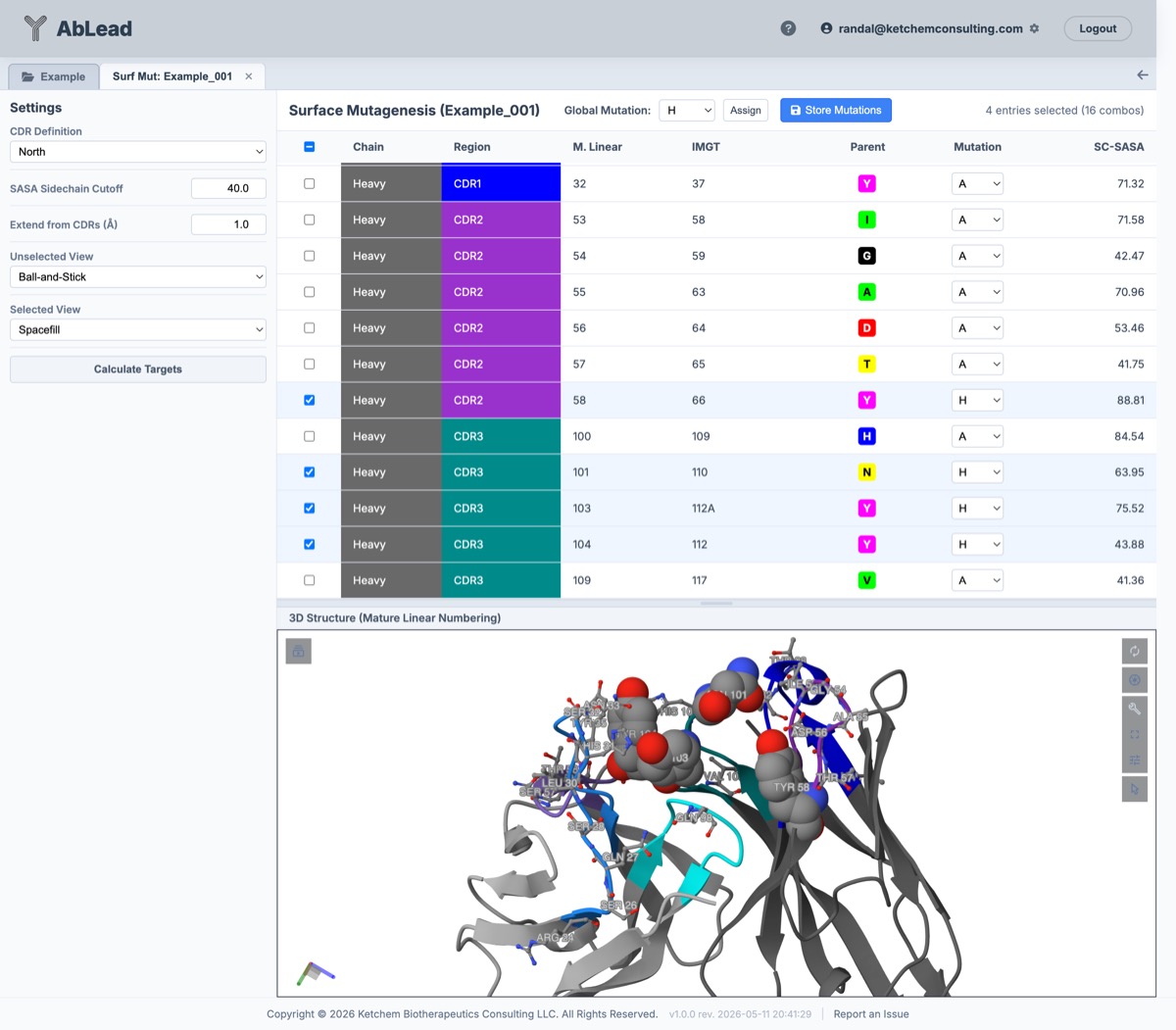
- Click Calculate Targets to run calculations. The target residues will populate the grid.
The target residues grid shows details for each candidate, including its Chain, Region (with a (P) indicator for residues predicted to participate in antigen binding by Paragraph with contact probability \(\ge 50\%\)), Mature Linear sequence position, system number position, parent amino acid, and its Sidechain SASA score. Hovering over a tagged Region cell displays a tooltip detailing the predicted paratope contact probability.
Designing and Storing Mutations
- Use the row checkboxes to select which target residues to include in your design.
- For each selected residue, select the desired mutant amino acid from the dropdown in the Mutation column (default is A).
- Use the Global Mutation dropdown menu and Assign button in the toolbar to change the target mutation globally for all checked residues at once.
- The toolbar displays the number of selected residues and the resulting number of combinatorial variants (2#) in real time (e.g.
3 entries selected (8 combos)). - Click Store Mutations to save the mutational designs to mutation design set named "Surface Mutagenesis" for the parent antibody in the Engineering tool. Once saved, these designs will be accessible in the Engineering tool to build, filter, and score sequence combinations.
References
- The PDB structure viewer is provided by Mol*.
- Paragraph paratope prediction is described in Chinery et al., Bioinformatics (2021).