Clading (Phylogenetics & Lineage Evolution)
View sequence-distance relationships, B-cell lineage evolution, somatic hypermutation (SHM) divergence, and ancestral developability evolution across your antibody repertoire.
This tool is essential for evaluating sequence diversity, tracking somatic mutations from unmutated germline precursors, identifying conserved functional families, and selecting lead candidates with optimal developability profiles.
The Clading tool exemplifies the core AbLead principle to "Be Inherently Lazy"—working very hard to build an easy, reproducible, and error-eliminating method to do work. Constructing cladograms, tracking multi-family germline lineages, and mapping site-specific developability liabilities across complex antibody families takes seconds rather than days of manual analysis.
Accessing the Tool
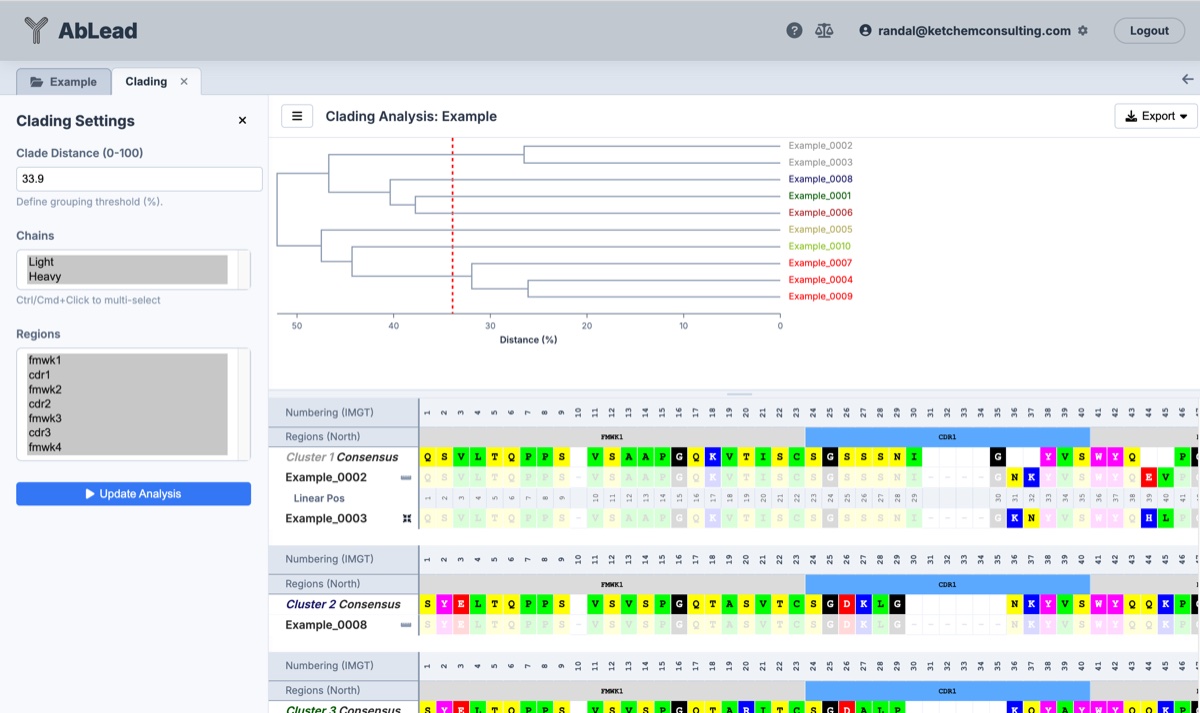
Select at least two antibodies in the Project View. Go to the Analysis menu and select Clading. This will open the Clading workspace in a new tab.
Using the Tool
- Tree Layouts: Switch dynamically between Standard (Linear) and Circular phylogenetic tree projections.
- Clade Distance Threshold: Define the sequence distance percentage (0–100%) used to partition antibodies into distinct clade clusters. The threshold can be adjusted by typing a value or dragging the vertical red cutoff line directly in the linear tree.
- Run Clading Analysis: Located at the top of the sidebar for immediate access. Recalculates the linkage matrix, cluster partitions, and alignments when changing core clustering parameters.
- Dynamic Settings: Toggling Include Germline (UCA) Roots, Show Branch Liability Badges, Clustering Basis, and Overlay Metrics updates the display instantaneously without requiring a manual re-run.
-
Clustering Basis: Select between two clustering metrics:
- Sequence Identity: Calculates pairwise Hamming distance across selected chains and regions.
- ABHAND Homology: Calculates pairwise physicochemical property distance, grouping sequences that share similar charge, hydrophobicity, and polarity characteristics even if exact amino acids differ.
-
Sequence Regions for Clading: Focus the phylogenetic tree calculation on specific chains (Light Chain (
VL), Heavy Chain (VH), or both) and specific variable domain regions (FMWK1–FMWK4, CDR1–CDR3). - Tree Scale & Zoom: Adjust tree width and vertical scale using the zoom buttons (
+,-,Reset) to comfortably inspect large repertoires. -
Export Options:
- Export Cluster Alignments (Excel): Exports the multi-chain sequence alignment grouped by clade cluster into a formatted Excel workbook, including cluster consensus sequences, closest germlines, and developability metrics.
- Export Cladogram (SVG): Exports the active cladogram (linear or circular) as a high-resolution vector graphic (
.svg), preserving active branch liability badges, cluster color coding, and metric overlays. - Export Phylogenetic Tree (Newick): Exports the hierarchical clustering tree as a standard phylogenetic Newick file (
.nwk) with ultrametric branch lengths calculated from sequence divergence linkage heights (node.dist / 2.0) and sanitized taxon labels (including unmutated common ancestor germline nodes when enabled), ready for direct downstream phylogenetic analysis and publication figure generation in external tools such as FigTree, iTOL, Dendroscope, and MEGA. - Save Clades to Results Metadata: Opens a modal to save cluster assignments as a new column in the project results table (categorized under Other directly after Notes). Column names default to
Fv Clade Distance <distance>(orVL/VHbased on chain selection) and populate 1-based cluster IDs (1,2,3...).
Germline (UCA) Lineage Rooting & SHM Divergence
Rooting the phylogenetic tree with unmutated germline precursors provides critical insight into the evolutionary trajectory of antibody discovery campaigns and affinity maturation pathways.
-
Multi-Family Precursor Identification: When Include Germline (UCA) Roots is enabled, the clading engine identifies all distinct V/J germline gene pairings across the repertoire (e.g.
IGKV1-39 / IGHV3-23andIGLV2-14 / IGHV1-69). It retrieves canonical unmutated reference sequences from the IMGT/V-BASE database and synthesizes distinct ancestral root nodes:Germline (IGKV1-39 / IGHV3-23) Germline (IGLV2-14 / IGHV1-69) -
Somatic Hypermutation (SHM) Divergence: For each candidate antibody, the system calculates exact SHM divergence against its assigned family germline precursor, reporting both total mutation count and percentage divergence across selected regions.
- Reference Root Protection: Synthesized germline roots serve as phylogenetic lineage anchors. They display distinct bold slate typography, suppress developability badges, and ignore click selection to maintain focus on true candidate antibodies.
Ancestral Branch Liability Mapping
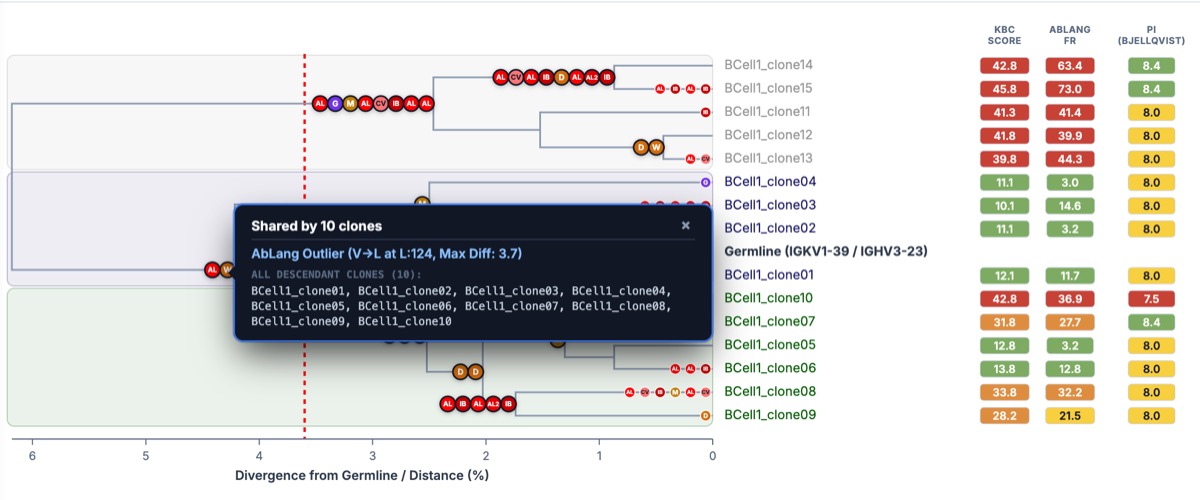
The Clading workspace features parsimonious branch liability mapping to track where sequence liabilities and developability risks arose during affinity maturation or protein engineering.
-
Parsimonious Branch Placement: Analyzes the phylogenetic linkage tree to determine whether a sequence liability is shared across an entire sub-lineage or arose as a private mutation in an individual clone:
- Shared Clade Badges (7.5px radius in linear / 7.0px in circular, bold border): Placed on ancestral parent branches when all descendant clones inherit the exact same mutation at the exact same IMGT position (e.g.
Shared by 3 clones: Isomerization at L:34-36 (DGD)). - Private Leaf Badges (6.0px radius in linear / 5.5px in circular, white border): Placed on individual leaf branches when a mutation is unique to a single clone (e.g.
Acquired in mAb_Gamma: Deamidation at H:110-112 (NNY)).
- Shared Clade Badges (7.5px radius in linear / 7.0px in circular, bold border): Placed on ancestral parent branches when all descendant clones inherit the exact same mutation at the exact same IMGT position (e.g.
-
Standard IMGT Ordering: Liability glyphs along any branch are strictly ordered by Light Chain (
VL) first, then Heavy Chain (VH), sorted linearly by IMGT numbering position (e.g.L:34 < L:107 < H:35 < H:110). - Cross-Branch Hover Linking (Hover Multi-Glow): Hovering over any liability badge illuminates all matching instances of that exact liability site across all branches and clades in the cladogram with an animated glow and high-contrast ring, while softly dimming unrelated badges for instant cross-lineage comparison. Hovering leaves the tree canvas 100% clean and unobstructed with zero floating popups over surrounding badges or clades.
-
Click-to-Open In-Place Detail Cards & Column Selection: Clicking any liability badge opens an interactive, in-place detail card anchored beside that glyph with a close button (
×), detailing the exact mutation, IMGT residue coordinates, motif, and the complete copyable list of all descendant member clones (Cmd+C/Ctrl+C). Clicking a glyph does not modify or shift the Clade Distance threshold line. Clicking outside or pressingEscapedismisses the card.- Select Residue Column in Sequence Group(s): Detail cards provide direct action buttons allowing users to select and highlight the corresponding residue column(s) in the sequence group table(s) below.
- Dynamic Clade Group Mapping: The primary action button automatically identifies the sequence group(s) containing the descendant clones (e.g.
Select Column in Cluster 1 (H:54-55)orSelect Column in 2 Clade Groups (L:30)). - All Sequence Groups Option: When multiple clade groups exist across the project, a secondary button (
Select in All N Sequence Groups) allows selecting that residue column across every clade sequence group below for cross-cluster comparison. - Reactive Toggle & Smooth Auto-Scroll: Clicking toggles between selecting and deselecting the column(s), automatically ensures the required chain and region are visible in the table, immediately updates the button state, and smoothly scrolls the lower sequence pane horizontally to center the column in view without disturbing the top tree view.
-
Adaptive Branch Stretching & 100% Glyph Visibility: Branches automatically stretch horizontally (linear trees) and radially (circular trees) to guarantee sufficient physical length for all mutation badges along that branch. This eliminates badge collapsing and ensures every single liability glyph is directly visible on the tree canvas, fully supporting multi-glow hover linking and instant at-a-glance lineage triage.
- Collision-Free Right Alignment: Badges are right-aligned to the right boundary of the tree (
sx_child - 7.0pxfor linear trees,R_tree - 7.0pxfor circular trees), expanding leftward along the branch with seamless edge-to-edge spacing to ensure zero overlap with candidate leaf labels. -
Standard Liability Notation:
- D (Amber
#D97706): Asparagine Deamidation (NG,NS,NN,NT,NA,ND) - I (Orange
#EA580C): Aspartate Isomerization (DG,DS,DD,DT,DH,DY) - G (Purple
#7C3AED): N-Linked Glycosylation (N-X-[S/T], \(X \neq P\)) - M (Mustard
#CA8A04): Methionine Oxidation - W (Amber
#D97706): Tryptophan Oxidation - H (Rose
#E11D48): Acid Hydrolysis (DP) - F (Rose
#E11D48): Fragmentation / Cleavage Motifs - SB (Red
#DC2626): Disrupted Conserved Salt Bridge - C (Red
#DC2626): Unusual Cysteine - C* (Red
#DC2626): Free Unpaired Cysteine - C- (Red
#DC2626): Missing Canonical Cysteine - FR (Burgundy
#B91C1C): Severe Framework Disruptions - AL (Red
#FF0000): AbLang Language Model Outlier - AL2 (Dark Red
#E60000): AbLang2 Language Model Outlier - IB (Crimson
#CC0000): IgBert Language Model Outlier - CV (Light Red
#FF8080): Covariance Violation
- D (Amber
Stability Cutoffs Configuration
The Clading settings sidebar incorporates real-time Stability Cutoffs identical to the Liabilities tool to control threshold sensitivity and framework/CDR inclusion for language model and covariance anomalies:
- AbLang Cutoff: Likelihood difference threshold (default
≥ 3.0, step0.1). OptionalInclude CDRscheckbox (default disabled). - AbLang2 Cutoff: Likelihood difference threshold (default
≥ 1.5, step0.1). OptionalInclude CDRscheckbox (default disabled). - IgBert Cutoff: Likelihood difference threshold (default
≥ 2.0, step0.1). OptionalInclude CDRscheckbox (default disabled). - CVV / Covariance Cutoff: Violation count threshold (default
≥ 2.0, step0.5). OptionalInclude CDRscheckbox (default disabled). - 1-Click Undo / Reset: Individual reset buttons (
↺) beside each cutoff restore platform baseline defaults instantly.
Candidate Details Flyout Card
Clicking any candidate antibody leaf label in the phylogenetic tree opens an interactive Candidate Details Card docked in the bottom-right corner:
- Header & Clade Assignment: Displays candidate name and assigned clade cluster pill with matching cluster color.
- KBC Score & SHM Divergence: Highlights overall KBC developability score and exact somatic hypermutation divergence (e.g.
12 mut (8.5%)) from the unmutated precursor. - Germline Precursor & Gene Calls: Shows assigned germline ancestor and specific V/J gene calls (
VL: ... | VH: ...). - Detected Sequence Liabilities: Lists all active liabilities found across Light and Heavy chains, or confirms
✓ Clean (No sequence liabilities). - Locate in Alignment: One-click button that smoothly scrolls to and highlights the candidate's sequence row in the alignment table.
Real-Time Liability Highlighting & Dimming Filter
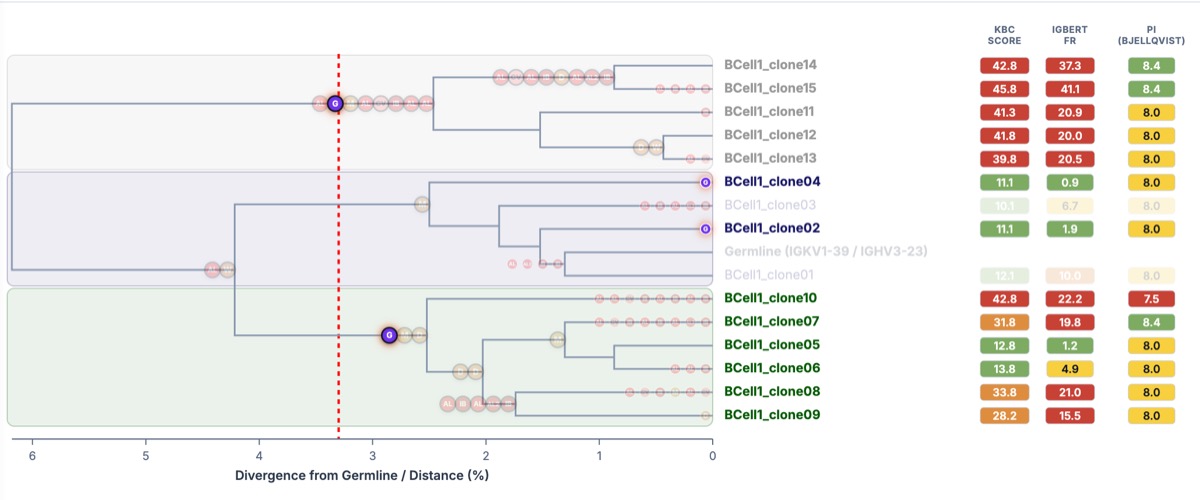
The sidebar includes an interactive Liability Filter panel with one-click checkboxes:
- Supported Filters: Deamidation, Isomerization, N-Glycosylation, Met Oxidation, Trp Oxidation, Free Cysteine, Severe FR Violations, AbLang, AbLang2, IgBert, Covariance, and High Risk Overall (KBC Score).
- Interactive Triage: Checking any filter instantly highlights matching candidate leaf labels, branch glyphs, and sequence rows in bold vivid colors while softly dimming non-matching clean clones to
opacity: 0.20. - Branch Glyph Labels Legend: A reference card at the bottom of the sidebar summarizes all branch glyph symbols, full liability names, and shared vs. private badge styling.
- Clear Filter: Resets opacity and highlighting across the entire workspace in one click.
Developability Multi-Metric Overlay
Visualize key developability attributes directly alongside phylogenetic tree leaves:
-
Available Overlay Metrics:
KBC Score(Overall developability score; see Plot Results to deconstruct into category liabilities)Total Liabilities(Count of all detected sequence liabilities)# Deamidation,# Isomerization,# Met Oxidation,# Trp Oxidation# Free Cys,# N-Glycosylation,# Severe FR Violations# Disrupted Salt Bridges(Disrupted conserved CDR3-FR salt bridges)Other: Custom project-level metadata attributes (such as expression yield, thermal stability, affinity, or custom numerical/text annotations) defined in the project table and uploaded with antibodies.
-
Compact Multi-Column Display: Select multiple metrics simultaneously to render side-by-side metric tracks with 2-line wrapped column headers (
<tspan>), compact column pitch (56–65px), and dynamic cluster averages. -
Clade Family Background Shading: Subtle shaded background bands with rounded corners and matching cluster palette tints highlight each clade family across the tree branches.
-
Platform Severity Color Coding: Values are automatically color-coded using AbLead severity standards (Green for Low Risk, Amber/Orange for Moderate Risk, Red for High Risk/Penalty).
Circular Dendrogram Layout
For large repertoires (\(N \ge 50\)), the Circular Layout provides a compact and intuitive global view:
-
Shaded Sector Arcs: Background sector arcs subtly highlight the radial boundaries of each clade family.
-
Outer Clade Labels: Curved bracket labels (
Clade X (N=...)) along the outer perimeter identify family groupings without crowding the root origin. -
Concentric Metric Pill Tracks & Headers: Overlay metrics are displayed as color-coded, formatted rectangular pills along dedicated concentric radial tracks with top ring headers (
KBC SCORE,TOTAL LIABILITIES), fully mirroring linear tree attributes. -
Dynamic Canvas Sizing: Automatically adjusts diameter and viewBox dimensions to fit long candidate names and multiple metric rings, eliminating edge truncation.
-
Radial Branch Glyphs: Parsimonious liability badges are positioned radially along branch paths without crossing branch boundaries.
Sequence Alignment & Consensus Grid
Below the cladogram, the workspace displays a full sequence alignment partitioned by clade cluster:
-
Sequence Liabilities & Grouping Box: Enable the Show Liabilities toggle in the sidebar to render dedicated
Liabilitiesrows directly above each antibody sequence row across all clade clusters:- Color-Coded Liability Highlights: Canonical liabilities (deamidation, isomerization, N-glycosylation, oxidation, hydrolysis, fragmentation, free cysteine, disrupted salt bridge) and language model / covariance outliers (
AbLang,AbLang2,IgBert,CVV) are highlighted using platform liability colors. Cells in the severe range display bold'S'indicators with detailed tooltip descriptions on hover. - Sticky Name Column Grouping Box: When auxiliary rows (mature linear numbers or liabilities) are visible, an accent grouping bracket (top border, left accent bar, and bottom border) encloses all rows for that antibody entry in the sticky name column, setting multi-row entries clearly apart without cluttering the residue grid.
- Sidebar Liability Legend: When enabled, the sidebar renders a dedicated liability color legend with severe threshold criteria and parsimonious single-residue highlighting explanations.
- Excel Export Parity: Exporting the clading analysis to Excel (
.xlsx) with liabilities enabled preserves formatted(Liabilities)rows with matching fill colors and severe indicators.
- Color-Coded Liability Highlights: Canonical liabilities (deamidation, isomerization, N-glycosylation, oxidation, hydrolysis, fragmentation, free cysteine, disrupted salt bridge) and language model / covariance outliers (
-
Cluster Consensus Rows: Each clade group displays a clean consensus sequence row (
Cluster X Consensus) calculated from member sequences. - ABHAND Color Coding: Amino acids are colored by chemical property using standard ABHAND palettes.
- Fade Consensus: Grays out conserved residues matching the consensus to highlight mutating positions across the family.
- Column & Row Selection Overlays: Click any column header cell (in the IMGT numbering or mature linear rows) or click a sequence row name to apply standard blue selection highlight overlays across aligned residues. Ctrl/Cmd/Shift-clicking individual residue cells also toggles column selection.
- Clade-Specific & Global Clear Controls: Each clade table header includes a dedicated clear button (
⊘) to clear selections within that specific clade group, while pressingEscapeclears all active selections across the workspace. - Direct Link to Tree Liabilities: When opening a liability tooltip in the cladogram above, clicking the Select Column action instantly highlights the residue column in the clade group(s) below, bridging phylogenetic branch mutations directly with sequence-level alignments.
- Engineering & Observations: Click any residue cell to add mutation designs for the Engineering tab or record position notes for the Observations tab. Indicator dots appear on annotated residues (eggshell square for engineering designs, orange circle for observations).