Assembler
Rebuild antibodies from their Fvs by selecting and dragging domain types such as Leader, KC, LC, CH1, Hinge, CH2, CH3-CHS, Linkers, and Multispecific parts.
This tool is useful for rebuilding antibodies from their Fvs in bulk or designing complex multi-chain formats, reducing human error and time.
The Assembler is a key implementation of the core work principle to "Be Inherently Lazy" (working very hard to build an easy, reproducible, and error-eliminating method to do work). Rather than manually copying, pasting, and concatenating variable regions and constant domains in Excel or text files to build formatted heavy and light chains—a tedious chore highly vulnerable to frame-shifts and copy-paste errors—you can use the Assembler to stitch domains together systematically and rebuild entire lead cohorts or multispecific configurations with drag-and-drop ease.
Accessing the Tool
Select at least one antibody in the Project View. Go to the Edit menu and select Assembler. This will open the Assembler workspace in a new tab.
Batch Mode
Batch Mode is designed for rebuilding standard monoclonal antibodies (mAbs) in bulk.
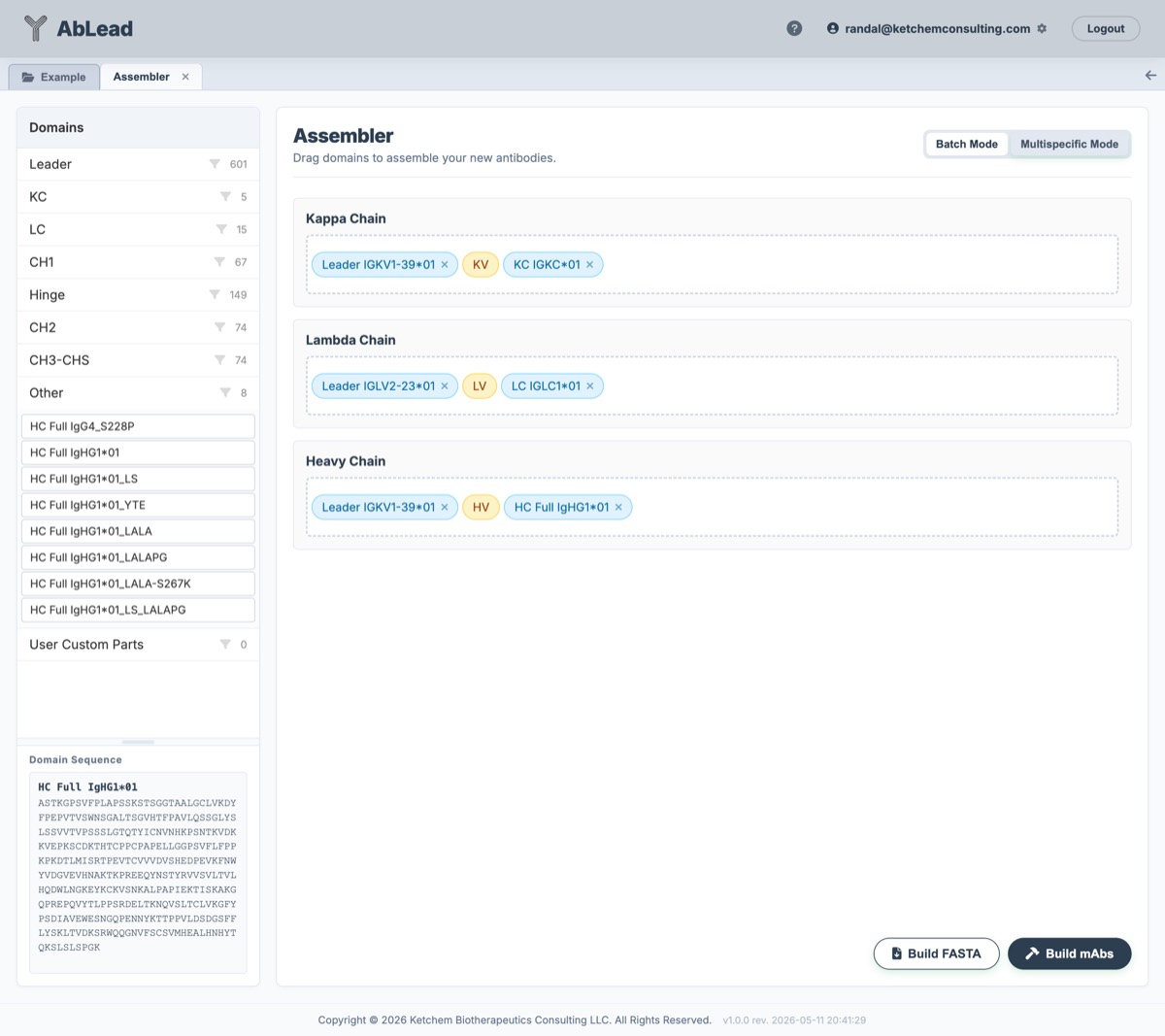
- Select Entries: The variable regions (VH and VL) from the selected entries populate the tool.
- Select Domains: Expand a domain type from the sidebar, select the desired constant domain, and drag it to the appropriate row (Kappa Chain, Lambda Chain, or Heavy Chain) relative to the variable domains.
- Chain Stoichiometry (
Copies): Set the number of copies of each chain (Kappa, Lambda, and Heavy, defaulting to2copies each) in the assembled molecule for deterministic Full Length (F-#) and Mature (M-#) Sequence Registry assignment. - Apply to All: The dragged constant domains are applied to all selected entries in the batch, combining each entry's variable domains with the selected constant domains.
- Build Options:
- Build FASTA: Generates and downloads the assembled antibody sequences as a FASTA file.
- Build New mAbs: Automatically processes and adds the assembled antibodies as new rows in the Project View grid.
Multispecific Mode
Multispecific Mode allows for the design of custom multi-chain structures, such as bispecifics, CrossMabs, scFvs, or fusion proteins.
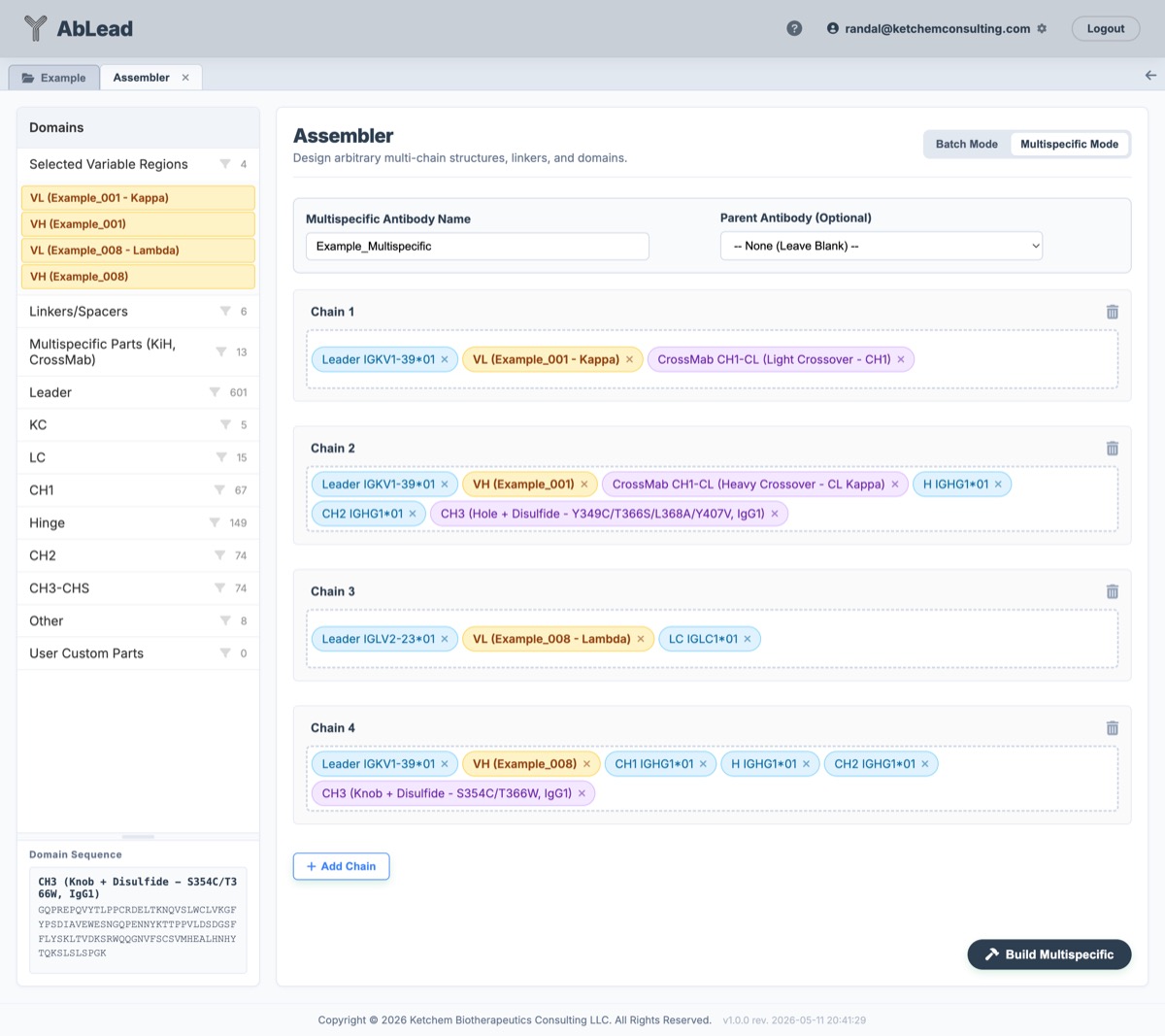
- Custom Chains: Click + Add Chain to add an arbitrary number of chains to the construct.
- Per-Chain Stoichiometry (
Copies): Specify the integer copy count (Copies, defaulting to1per chain) in each chain header to define the exact molecular stoichiometry used when registering Full Length (F-#) and Mature (M-#) Sequence Registry IDs. - Drag-and-Drop Assembly: Drag selected variable regions, native constant domains, linkers, or engineered parts into any chain row in any order.
-
Multispecific & Engineered Parts: The sidebar provides premium engineered parts for bispecific design, including:
- Knobs-into-Holes (KiH): Stabilized Knob/Hole CH3 domains for IgG1 and IgG4.
- CrossMab Crossover Parts: Swapped CH1-CL parts for Kappa and Lambda formats to ensure correct light chain pairing.
- Linkers: Common flexible and rigid linkers.
-
User Custom Parts: Users can create their own custom sequences at the bottom of the sidebar. These parts persist per-user and can be dragged into any construct.
- Parent Antibody: Users can designate a "Parent Antibody" from the project to track lineage and heritage.
- Reconstruct and Re-edit: When opening the Assembler for an existing multispecific entry, the workspace automatically restores the exact layout, parts, names, and custom sequences.
Multispecific Entry Representation
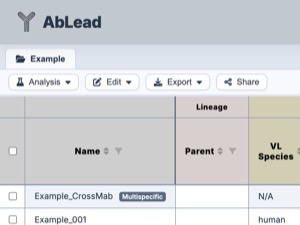
Once built, a multispecific antibody is represented in the project view with multiple chains and placeholder scoring:
Multispecific Workflow
- In the Project View, select at least one entry
- Go to the Edit menu and select Assembler. This will open the Assembler workspace in a new tab.
- Click the Multispecific Mode tab.
- Click + Add Chain to add a new chain if needed.
- Drag and drop selected variable regions, native constant domains, linkers, or engineered parts into any chain row in any order.
- Set the Parent Antibody for lineage tracking.
- Click Build to generate the multispecific antibody as a new entry in the Project View.
- Use Extract Fvs to extract Fvs from an existing multispecific antibody.
[!NOTE] Multispecific Antibodies: Because multispecific antibodies consist of arbitrary multi-chain constructs (such as bispecifics or CrossMabs), they bypass sequence-level scoring and do not display residue-level stability, surface property, humanness, or liability analysis values in the Project View.
Multispecific Parts
The Assembler provides several engineered domains in the sidebar under the Multispecific Parts (KiH, CrossMab) category to facilitate the design of heterodimeric and crossover multi-chain constructs:
Knobs-into-Holes (KiH) CH3 Domains
Designed to promote heavy chain heterodimerization by engineering complementary steric interfaces:
-
IgG1 KiH (Standard):
- CH3 (Knob - T366W, IgG1): Introduces the bulky T366W mutation into one CH3 domain.
- CH3 (Hole - T366S/L368A/Y407V, IgG1): Introduces complementary smaller mutations into the opposing CH3 domain.
-
IgG1 KiH (Disulfide Stabilized): Adds S354C/Y349C mutations to introduce an inter-chain disulfide bond:
- CH3 (Knob + Disulfide - S354C/T366W, IgG1)
- CH3 (Hole + Disulfide - Y349C/T366S/L368A/Y407V, IgG1)
-
IgG4 KiH (Standard):
- CH3 (Knob - T366W, IgG4)
- CH3 (Hole - T366S/L368A/Y407V, IgG4)
-
IgG4 KiH (Disulfide Stabilized):
- CH3 (Knob + Disulfide - S354C/T366W, IgG4)
- CH3 (Hole + Disulfide - Y349C/T366S/L368A/Y407V, IgG4)
CrossMab Crossover Domains
Used to solve light chain mispairing in bispecific antibodies by crossing over (swapping) the CH1 and CL domains:
-
Light Chain Crossover:
- CrossMab CH1-CL (Light Crossover - CH1): Standard crossover CH1 domain used on the light chain, ending in
+EPKSCto match biologically validated structures.
- CrossMab CH1-CL (Light Crossover - CH1): Standard crossover CH1 domain used on the light chain, ending in
-
Heavy Chain Crossover:
- CrossMab CH1-CL (Heavy Crossover - CL Kappa): Swapped constant kappa domain used on the heavy crossover chain.
- CrossMab CH1-CL (Heavy Crossover - CL Kappa, ASVA): Swapped constant kappa domain with the ASVA elbow region optimization to minimize steric strain at the V-C interface.
- CrossMab CH1-CL (Heavy Crossover - CL Lambda 1): Swapped constant lambda 1 domain.
- CrossMab CH1-CL (Heavy Crossover - CL Lambda 2): Swapped constant lambda 2 domain.
Charge-Pair / Steering / SEED Domains
Alternative heterodimerization strategies:
-
Electrostatic Steering (IgG1): Uses charge-pair mutations (K409D/K392D vs. D399K/D356K) to drive heterodimerization:
- CH3 (Steering DK - K409D/K392D, IgG1)
- CH3 (Steering KK - D399K/D356K, IgG1)
-
SEED (Strand-Exchange Engineered Domain): Utilizes alternating segments of human IgG and IgA CH3 sequences to create complementary heterodimeric interfaces:
- CH3 (SEED AG, IgG/A)
- CH3 (SEED GA, IgG/A)
-
Orthogonal CH1/CL (Charge-Pair Crossover Alternative): Employs reciprocal mutations (K147E/K213E on CH1 and E123K/Q160K on CL Kappa) to enforce correct light chain pairing:
- CH1 (Orthogonal - K147E/K213E, IgG1)
- CL Kappa (Orthogonal - E123K/Q160K)
Specific Hinge Domains
- Hinge (S228P, IgG4): IgG4 Hinge containing the S228P stabilization mutation to prevent Fab-arm exchange.
- Hinge (DKTHT, IgG1 Crossover): Truncated IgG1 Crossover Hinge (starting with
DKTHT) optimized for correct heavy chain crossover alignment.
Specialty Mutations
Specialty Mutations allow you to apply effector silencing, half-life extension, and stability modifications on-the-fly when building or exporting your antibodies, eliminating the need to maintain multiple copies of mutant regions in your parts library.
These modifications can be dynamically applied to heavy and light chains during standard or multispecific builds:
-
Effector Silencing (CH2):
- LALA (L234A/L235A): Replaces
...PAPELLGGP...with...PAPEAAGGP...in IgG1 to eliminate Fcγ receptor binding and suppress antibody-dependent cellular cytotoxicity (ADCC) and complement-dependent cytotoxicity (CDC). - LALAPG (L234A/L235A/P329G): Adds the P329G mutation to the LALA mutations to further abolish Fc receptor activation.
- LALA (L234A/L235A): Replaces
-
Half-Life Extension (CH2/CH3):
- LS (M428L/N434S): Enhances binding affinity to the neonatal Fc receptor (FcRn) at acidic pH, extending the serum half-life.
- YTE (M252Y/S254T/T256E): Enhances binding affinity to the neonatal Fc receptor (FcRn) at acidic pH, extending the serum half-life.
-
Disulfide Stabilization (Fv/scFv):
- H44-L100 (IMGT H49-L120): Introduces an interdomain disulfide bond to stabilize the Fv/scFv interface. Mutates Kabat HC 44 (IMGT H49) in VH FR2 (
WIRQPPGKGLEWIG->WIRQPPGKCLEWIG) and Kabat LC 100 (IMGT L120) in VL FR4 (FGQGTKLEIKR->FGCGTKLEIKR) to Cysteines.
- H44-L100 (IMGT H49-L120): Introduces an interdomain disulfide bond to stabilize the Fv/scFv interface. Mutates Kabat HC 44 (IMGT H49) in VH FR2 (
Quick Build Templates
The Quick Build dropdown in both Batch Mode and Multispecific Mode allows you to instantly layout and pre-populate chain dropzones with appropriate constant domains, signal leaders, heterodimerization parts, and linkers.
Batch Mode Presets
- IgG1: Adds leader
Leader IGKV1-39*01to Kappa and Heavy chains,Leader IGLV2-23*01to Lambda chains; constant regionsKC IGKC*01for Kappa,LC IGLC1*01for Lambda, and full heavy constant regionHC Full IgHG1*01for Heavy chains. - IgG2: Adds leader
Leader IGKV1-39*01to Kappa and Heavy chains,Leader IGLV2-23*01to Lambda chains; constant regionsKC IGKC*01for Kappa,LC IGLC1*01for Lambda, and full heavy constant regionHC Full IgHG2*01for Heavy chains. - IgG4 Hinge Modified: Adds leader
Leader IGKV1-39*01to Kappa and Heavy chains,Leader IGLV2-23*01to Lambda chains; constant regionsKC IGKC*01for Kappa,LC IGLC1*01for Lambda, and full modified heavy constant regionHC Full IgG4_S228Pfor Heavy chains.
Multispecific Mode Presets
- CL-CH1 CrossMab (4-chain): Configured using clinical standards (like Faricimab and Vanucizumab). It places the CrossMab CH1-CL (Light Crossover - CH1) light crossover constant domain (ending in
+EPKSC) on the first light chain, the CH3 (Hole + Disulfide - Y349C/T366S/L368A/Y407V, IgG1) variant and a truncated crossover hinge (Hinge (DKTHT, IgG1 Crossover)) on the first heavy chain, and the CH3 (Knob + Disulfide - S354C/T366W, IgG1) variant with a native hinge on the standard heavy chain. It uses the ASVA-optimized crossover CL Kappa part (CrossMab CH1-CL (Heavy Crossover - CL Kappa, ASVA)) to minimize steric strain at the V-C interface. - Fv CrossMab (4-chain): Sets up a variable domain crossover using Knob/Hole Fc domains.
- Knobs-into-Holes (KiH) (4-chain): Sets up standard 4-chain heterodimers with matching Knob and Hole CH3 modifications.
- scFv-Fc Fusion (2-chain): Builds two scFv chains linked to Knob and Hole Fc backbones.
- BiTE (1-chain): Standard single-chain bispecific T-cell engager layout utilizing flexible
(G4S)3linkers within each scFv and a shortG4Slinker between the scFvs.
[!IMPORTANT] Starting Point Only: Quick Build templates are designed as a starting point. Depending on your target targets, specific molecular engineering, linker adjustments, allotypic changes, or additional junction modifications may be required for your specific molecule.
References
- The Domain sequences were obtained using the IMGT/GENE-DB database.
-
Fv/scFv Disulfide Stabilization (H44-L100):
- Zhao JX, et al. (2011) "Stabilization of the Single-Chain Fragment Variable by an Interdomain Disulfide Bond and Its Effect on Antibody Affinity." International Journal of Molecular Sciences. 12(1): 1-11. doi:10.3390/ijms12010001.
-
CrossMAb Technology:
- Schaefer W, et al. (2011) "Immunoglobulin domain crossover as a strategy for the production of multispecific antibodies." Proceedings of the National Academy of Sciences. 108 (27) 11187-11192. doi:10.1073/pnas.1019002108.
- Klein C, et al. (2016) "The use of CrossMAb technology for the generation of bi- and multispecific antibodies." mAbs. 2016 Jun 10;8(6):1010–1020. PMCID:PMC4968094 (Details structural elbow region optimizations).
-
Knobs-into-Holes (KiH):
- Ridgway JB, Presta LG, Carter P. (1996) "Knobs-into-holes' engineering of antibody CH3 domains for heavy chain heterodimerization." Protein Engineering. doi:10.1093/protein/9.7.617.
-
Electrostatic Steering:
- Gunasekaran K, et al. (2010) "Enhancing antibody Fc heterodimer formation through electrostatic steering effects: applications to bispecific molecules and monovalent IgG." Journal of Biological Chemistry. 285 (25) 19637-19646. doi:10.1074/jbc.M110.117382.
-
Strand-Exchange Engineered Domain (SEED):
- Davis JH, et al. (2010) "SEEDbodies: fusion proteins based on strand-exchange engineered domain (SEED) CH3 heterodimers in an Fc analogue platform for asymmetric binders or immunofusions and bispecific antibodies." Protein Engineering, Design and Selection. 23 (4) 195-202. doi:10.1093/protein/gzp094.
-
Orthogonal Fab Interface:
- Lewis SM, et al. (2014) "Generation of bispecific IgG antibodies by structure-based design of an orthogonal Fab interface." Nature Biotechnology. 32 (2) 191-198. doi:10.1038/nbt.2797.
-
BiTE (Bispecific T-cell Engager):
- Baeuerle PA, Reinhardt C. (2009) "Bispecific T-cell engaging antibodies for cancer therapy." Cancer Res (2009) 69 (12): 4941–4944. doi:10.1158/0008-5472.can-09-0547.
-
Fc Effector Silencing (LALA & LALAPG):
- Hezareh M, et al. (2001) "Effector function activities of a panel of mutants of a broadly neutralizing antibody against human immunodeficiency virus type 1." Journal of Virology. 75 (24) 12161-12168. doi:10.1128/jvi.75.24.12161-12168.2001.
- Schlothauer T, et al. (2016) "Novel human IgG1 and IgG4 Fc-engineered antibodies with completely abolished immune effector functions." Protein Engineering, Design and Selection. 29 (10) 457-466. doi:10.1093/protein/gzw040.
-
Fc Half-Life Extension (LS & YTE):
- Zalevsky J, et al. (2010) "Enhanced antibody half-life improves in vivo activity." Nature Biotechnology. 28 (2) 157-159. doi:10.1038/nbt.1601.
- Dall'Acqua WF, et al. (2006) "Properties of human IgG1s engineered for enhanced binding to the neonatal Fc receptor (FcRn)." Journal of Biological Chemistry. 281 (33) 23514-23524. doi:10.1074/jbc.M604292200.