Engineer pI
The Engineer pI tool allows for the identification and mutation of surface-exposed, charged residues to shift the isoelectric point (pI) of an antibody while monitoring the impact on humanness scores.
IgG1s with weakly basic isoelectric points between 8–8.5, and Fv isoelectric points between 7.5–9, typically display the best combinations of strong repulsive self-interactions and weak non-specific interactions [Gupta et al.]
Applying this tool is another expression of the core work principle to "Be Inherently Lazy"—working very hard to build an easy, reproducible, and error-eliminating method to do work. Instead of manually inspecting structural models in PyMOL or MOE, cross-referencing solvent-accessible surface areas (SASA), manually filtering candidates, and calculating combinatorial pI/humanness trade-offs in Excel, the Engineer pI tool automates this complex analysis and generates optimal, humanness and stability-constrained variants in seconds.
Isoelectric Point Calculation
The isoelectric point (\(\text{pI}\)) is the \(\text{pH}\) at which an antibody or multi-chain complex carries zero net electrical charge (\(Z(\text{pH}) = 0\)). In the Engineer pI tool, two complementary calculation methodologies are provided to evaluate and guide charge engineering:
Theoretical Sequence-Based pI (Bjellqvist Method)
The theoretical sequence \(\text{pI}\) is computed using the classical Bjellqvist method (Bjellqvist et al., 1993, 1994). The net electrical charge \(Z(\text{pH})\) of the multi-chain complex is determined across the \(\text{pH}\) scale by summing the partial charges of all ionizable amino acid side chains and the terminal amino and carboxyl groups:
-
Positively Charged Groups:
- Lysine (Lys / K, \(\text{p}K_a = 10.0\))
- Arginine (Arg / R, \(\text{p}K_a = 12.0\))
- Histidine (His / H, \(\text{p}K_a = 5.98\))
- N-terminal amino groups (sequence-dependent \(\text{p}K_a\): Ala = 7.59, Met = 7.00, Ser = 6.93, Pro = 8.36, Thr = 6.82, Val = 7.44, Glu = 7.70, default = 7.50)
-
Negatively Charged Groups:
- Aspartic acid (Asp / D, \(\text{p}K_a = 4.05\))
- Glutamic acid (Glu / E, \(\text{p}K_a = 4.45\))
- Cysteine (Cys / C, \(\text{p}K_a = 9.0\))
- Tyrosine (Tyr / Y, \(\text{p}K_a = 10.0\))
- C-terminal carboxyl groups (sequence-dependent \(\text{p}K_a\): Asp = 4.55, Glu = 4.75, default = 3.55)
The theoretical \(\text{pI}\) is determined by solving for \(Z(\text{pH}) = 0\) using a bisection algorithm across both chains (Light and Heavy). By substituting surface-exposed charged residues, the net charge curve is altered, shifting the resulting \(\text{pI}\) toward more basic (higher) or more acidic (lower) values.
Empirical 3D Structure-Based Folded pI (PROPKA Method)
While sequence-based methods assume all ionizable residues behave as in an unfolded polypeptide, the folded 3D structural microenvironment perturbs individual \(\text{p}K_a\) values. The empirical folded \(\text{pI}\) is computed using PROPKA 3 (Søndergaard et al., 2011) directly on 3D atomic coordinates:
- Desolvation (\(\Delta \text{p}K_a^\text{desolv}\)): Penalizes buried charges based on local atomic packing density and solvent accessibility.
- Hydrogen Bonding (\(\Delta \text{p}K_a^\text{H-bond}\)): Stabilizes ionized or neutral states through backbone and side-chain hydrogen bonds.
- Coulombic Interactions & Salt Bridges (\(\sum \Delta \text{p}K_a^\text{Coulomb}\)): Models pair-wise electrostatic interactions (such as conserved core \(\text{V}_\text{H}\) salt bridges) with distance-dependent dielectric screening.
For full-length antibody constructs, the hybrid PROPKA/Bjellqvist method is utilized: variable domain (Fv) 3D structural electrostatics are evaluated via PROPKA and summed with sequence-based Bjellqvist titration for the constant domains (\(\text{C}_\text{H}1\text{--}\text{hinge}\text{--}\text{C}_\text{H}2\text{--}\text{C}_\text{H}3\) and \(\text{C}_\text{L}\)). Because the flexible hinge separates the variable and constant regions beyond the Debye screening distance (\(\sim 8\,\text{Å}\) at physiological ionic strength), this provides an accurate full-length folded \(\text{pI}\) prediction.
During combinatorial variant generation, empirical folded \(\text{pI}\) values are computed using Delta Titration on the parent 3D PROPKA electrostatic baseline. Because candidate residues are filtered specifically for high solvent exposure (\(\text{SASA} > 10.0\,\text{Å}^2\)), substituting the parent residue titration curve with the candidate mutant residue's model \(\text{p}K_a\) provides rapid (sub-millisecond), accurate structure-based folded \(\text{pI}\) predictions across all generated combinations.
Accessing the Tool
Select exactly one antibody in the Project View which has an associated PDB file. Go to the Edit menu and select Engineer pI. This will open the Engineer pI workspace in a new tab.
Using the Tool
Targeting Residues
-
Select Shift Direction: Choose whether to shift the pI "Higher" (more basic) or "Lower" (more acidic).
-
Select Target Residues: Choose whether to target:
-
Charged Only (D, E or K, R, H) (Default): Focuses exclusively on neutralizing or reversing existing formal charges (targeting D, E when shifting higher; targeting K, R, H when shifting lower).
-
All Surface Residues (Include Neutrals): Broadens candidate identification to all surface-exposed positions, allowing neutral residues to mutate into charged residues for de novo charge introduction (e.g., \(\text{Val} \rightarrow \text{Arg}\) to increase pI, or \(\text{Gln} \rightarrow \text{Glu}\) to decrease pI). When shifting higher, neutral positions are constrained to mutate to basic residues (\(\text{K}, \text{R}, \text{H}\)); when shifting lower, neutral positions are constrained to mutate to acidic residues (\(\text{D}, \text{E}\)).
-
-
Select Exclusions: Apply structural filters to protect binding and folding:
-
Exclude Honegger (Maintain Binding) (Default): Restricts targets to the permissive outer framework positions defined by the humanization template mask (
HUMANIZATION_MASK_HCandHUMANIZATION_MASK_LC), automatically shielding CDR loops, Vernier-adjacent scaffolding positions, and single-domain VHH hallmark residues. -
Exclude CDRs: Excludes CDR loop positions under the active region scheme while allowing all framework positions.
-
None: Evaluates all surface-exposed positions without structural exclusions.
-
-
Select Replacement Pool: Choose which residue classes to include in the search (ABHAND). The default is all but those being shifted from.
-
Select SASA Cutoff: Adjust the Solvent Accessible Surface Area (SASA) cutoff to target only residues whose sidechains are sufficiently exposed (default is 10.0 Ų).
-
Click Calculate Targets to generate a list of residues that meet the shift, exposure, and exclusion criteria.
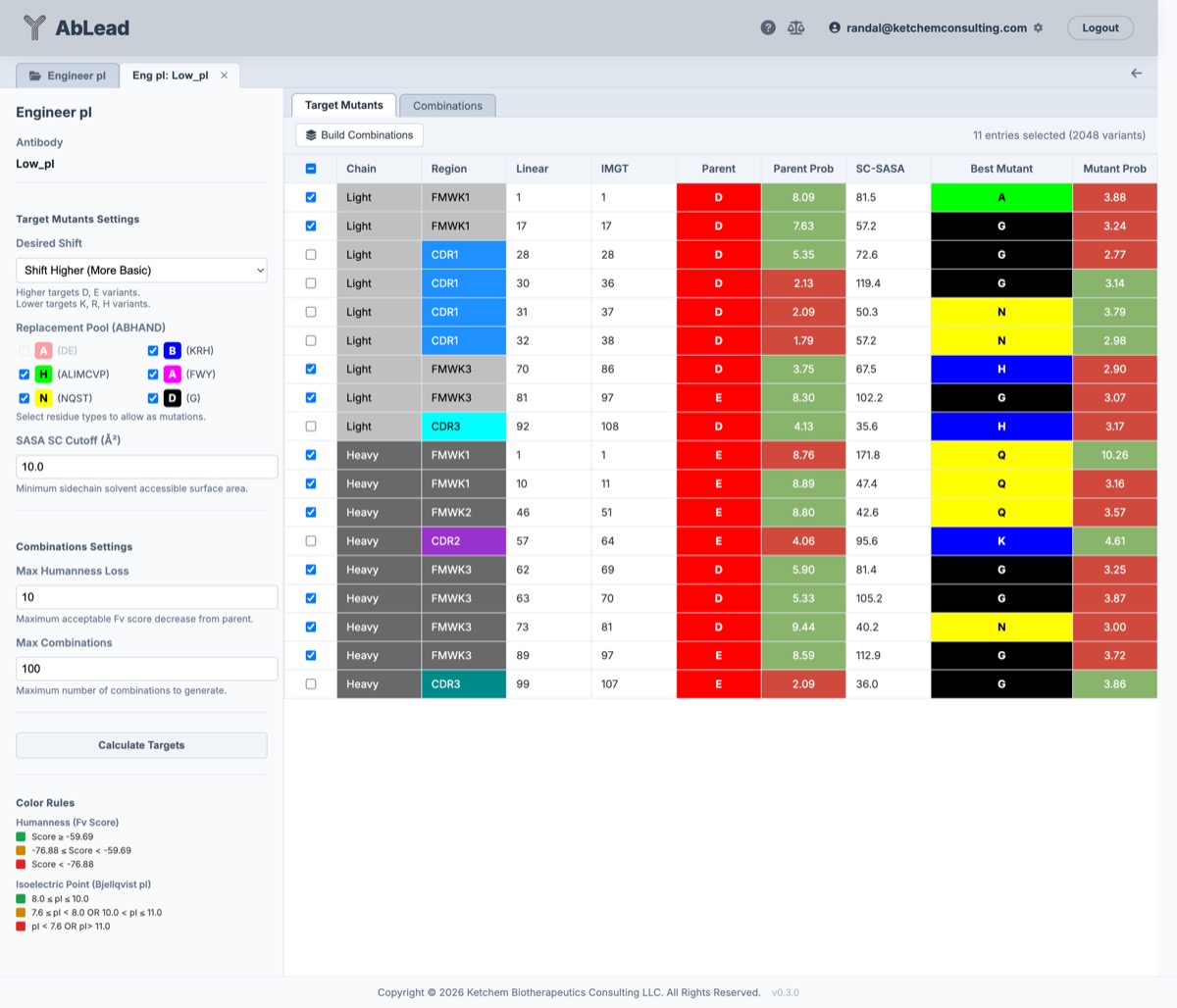
At this point, the Target Mutants tab will be populated with a grid of residues that meet the shift, exposure, and exclusion criteria. The tool suggests the highest likelihood mutation from the Replacement Pool for each position based on AbLang probabilities. Positions belonging to Honegger structural exclusions are indicated with a (H) in the Region column, positions belonging to the classic 30 Vernier zone residues are indicated with a (V), positions predicted to participate in antigen binding by Paragraph (contact probability \(\ge 50\%\)) are indicated with a (P), and positions belonging to multiple categories display combined tags (e.g., (H, P), (V, P), or (H, V, P)). Hovering over a tagged region cell displays a tooltip detailing the structural exclusion, Vernier classification, and predicted paratope contact probability. Clicking the Parent residue cell for any target position opens the shared Engineering Modal, allowing direct inspection of predictive scans and entry of custom mutation designs for that position.
Below the table is a visual representation of the antibody structure where the targeted residues are shown in stick format. Selected rows in the table are shown as spacefill. These visual representations may be changed in the settings panel. This helps select positions to modify pI without impacting binding.
The selected rows of the target mutants table may be exported as an Excel file by clicking the Export Excel button at the top of the Target Mutants tab.
The toolbar in the Target Mutants tab also provides a Select Best 10 button. This feature automatically identifies and selects the 10 most inert, non-disruptive framework surface mutations to achieve the desired pI shift while minimizing the risk of impacting binding affinity, structural stability, or chain pairing. Candidate residues are evaluated and scored according to four biophysical, structural, and language model criteria:
- AbLang Stability Preservation (30%): Minimizes individual antibody language model fitness penalties (\(\Delta\text{pAbLang} = \text{parent\_prob} - \text{mutant\_prob}\)) to ensure mutations are natively tolerated in antibody folding repertoires and avoid destabilizing critical loop or scaffolding residues.
- Sapiens Humanness Preservation (30%): Minimizes loss of human-specific likelihood (\(\Delta\text{Sapiens} = P_\text{parent} - P_\text{mutant}\)) evaluated using the Sapiens human antibody transformer model. Sapiens provides position-specific continuous probabilities across the variable domain, prioritizing mutations that strictly maintain high human sequence likelihood over species-agnostic or low-frequency substitutions.
- CDR Distance with 14 Å Saturation (20%): Maximizes 3D Euclidean heavy-atom distance from all CDR residues to avoid perturbing antigen binding, saturated at \(14.0\,\text{Å}\) (\(\min(d_\text{CDR}, 14.0) / 14.0\)).
- Interface Distance with 14 Å Saturation (20%): Maximizes 3D Euclidean heavy-atom distance from the partner variable domain to prevent disrupting the VH/VL interface (neutral for single-domain antibodies), saturated at \(14.0\,\text{Å}\) (\(\min(d_\text{interface}, 14.0) / 14.0\)).
The \(14.0\,\text{Å}\) distance saturation threshold is based on three biophysical and structural principles:
- Electrostatic Screening: At physiological ionic strength (\(\sim 150\,\text{mM}\)), the Debye screening length is \(\approx 8\,\text{Å}\). At \(14\,\text{Å}\) (\(\approx 1.75\times\) Debye length), solvent counter-ions screen electrostatic potential changes by \(> 85\text{--}90\%\), so additional physical distance provides negligible incremental electrostatic protection for the paratope or interface.
- Domain Dimensions: Across standard variable domains (\(\sim 40 \times 25 \times 25\,\text{Å}\)), residues at \(d \ge 14\,\text{Å}\) are already well clear of both the paratope perimeter and the Vernier scaffolding zone (\(< 6\text{--}10\,\text{Å}\)).
- Preventing Loop-Tip Distortion: Without saturation, positions at the extreme opposite vertices of the domain (\(22\text{--}26\,\text{Å}\), such as FR1/FR4 loop tips) receive disproportionate distance credit that overpowers language model penalties, repeatedly selecting destabilizing loop mutations. Capping at \(14.0\,\text{Å}\) ensures all sufficiently isolated framework positions receive full structural clearance credit (score = 1.0), allowing sequence compatibility and humanness to guide final candidate selection.
The top 10 candidates strictly obey Honegger structural exclusions, protect predicted paratope contact residues, exclude N-terminal position 1 (which packs directly against CDR1 in 3D space), and are highlighted in the 3D structure viewer upon selection. Hovering the cursor over any row in the Target Mutants grid displays a tooltip with these individual structural and predictive metrics, including \(\Delta\text{pAbLang}\) and \(\Delta\text{Sapiens}\) humanness delta. Residue labels in the 3D structure viewer explicitly indicate chain identity (e.g. [H: Pos 10] vs [L: Pos 17]).
Creating Mutation Designs
-
Select the desired residues in the Target Mutants tab (or click Select Best 10).
-
Set Max Combinations to limit the number of variants generated.
-
Set Max Sapiens Humanness Loss to limit lowering of the Sapiens humanness score relative to the parent (default:
0.03). If set to a value \(\le 0.5\), it represents an absolute score drop; if \(> 0.5\), it is treated as a percentage drop. -
Set Max pAbLang Full Loss to limit worsening of the language model perplexity score (default:
20.0). -
Click Build Combinations in the Target Mutants tab to generate a set of combinatorial variants based on the selected residues.
Pay attention to the variant counter in the upper right corner of the Target Mutants tab (e.g., 10 entries selected (1,024 variants) or 42 entries selected (4,398,046,511,104 variants) formatted with standard thousands separators). If the number of selected entries is too large, the combinatorial search space expands exponentially (\(2^n\) variants). Selecting the top 10 positions generates an optimal pool of \(2^{10} = 1,024\) candidates for combinatorial screening.
During Build Combinations, all possible combinatorial variants are evaluated. Combinatorial humanness scores are computed via Sapiens Delta Titration in sub-milliseconds from the parent variable domain transformer likelihood matrix:
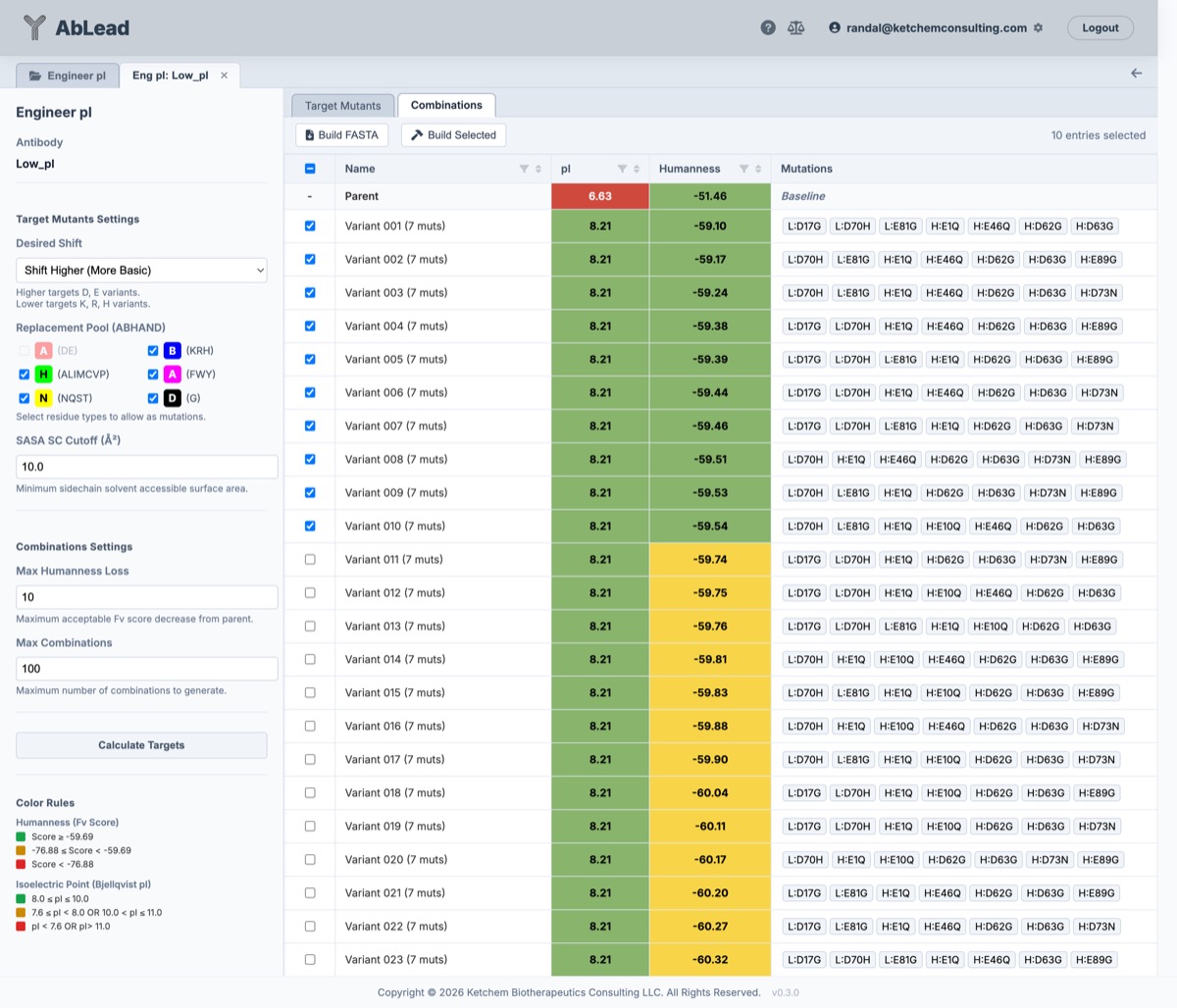
If a variant's Sapiens score decreases beyond Max Sapiens Humanness Loss (\(\text{Sapiens}_\text{combo} < \text{Sapiens}_\text{parent} - \Delta_\text{max}\)) or exceeds Max pAbLang Full Loss, it is discarded. After humanness and stability filtering, all variants must have a pI shifted in the desired direction. The resulting variants are sorted by pI (rounded to the nearest 0.01) and then sorted by Sapiens score (high to low), and the top Max Combinations variants are displayed in the Combinations tab.
Because Engineer pI requires an associated 3D structure, the Combinations table and Excel export provide both the sequence-based pI (Bjellqvist method) and the empirical 3D structure-based PROPKA folded \(\text{pI}\) (calculated using the rapid Delta Titration method on the parent 3D PROPKA baseline, combining Fv structural electrostatics with constant domain titration). The Combinations grid supports interactive multi-column composite sorting across Name, pI, PROPKA, pAbLang Full, and Sapiens Fv columns with 3-way toggle cycling and numbered precedence badges ([1], [2], [3], etc.).
The Max Combinations, Max Sapiens Humanness Loss, and Max pAbLang Full Loss parameters may be adjusted after evaluation of the generated variants and Build Combinations re-run.
The selected rows of the combinations table may be exported as an Excel file by clicking the Export Excel button at the top of the Combinations tab.
In the Combinations tab a row or set of rows may be selected to visualize the residues in those designs on the structure.
Reviewing and Building Variants
- Select the desired variants to be built in the Combinations tab.
- Click Build FASTA to generate and download a FASTA file of the targeted variants.
- Click Build Selected to build and process the selected variants into the project view.
- Click Build Engineering Sets to convert each selected variant into a named Engineering mutation set (e.g.
pI Variant 1,pI Variant 2) in the antibody's Engineering workspace for further editing or evaluation.
References
- Bjellqvist, Bengt, Graham J. Hughes, Christian Pasquali, Nicole Paquet, Florence Ravier, Jean-Charles Sanchez, Sabina Frutiger, and Denis Hochstrasser. “The focusing positions of polypeptides in immobilized pH gradients can be predicted from their amino acid sequences.” Electrophoresis 14, no. 1 (1993): 1023–1031. https://doi.org/10.1002/elps.11501401163.
- Bjellqvist, Bengt, Bodil Basse, Eydfinnur Olsen, and Julio E. Celis. “Reference points for comparisons of two-dimensional maps of proteins from different cell types defined in a pH scale.” Electrophoresis 15, no. 1 (1994): 529–539. https://doi.org/10.1002/elps.1150150171.
- Chinery, Luke, Isaac P. Wong, Jinwoo Leem, and Charlotte M. Deane. “Paragraph: antibody paratope prediction using graph neural networks with minimal feature engineering.” Bioinformatics 37, no. 23 (2021): 4557–4559. https://doi.org/10.1093/bioinformatics/btab158.
- Gupta, Priyanka, Emily K. Makowski, Sandeep Kumar, Yulei Zhang, Justin M. Scheer, and Peter M. Tessier. “Antibodies with Weakly Basic Isoelectric Points Minimize Trade-Offs between Formulation and Physiological Colloidal Properties.” Molecular Pharmaceutics 19, no. 3 (2022): 775–87. https://doi.org/10.1021/acs.molpharmaceut.1c00373.
- Søndergaard, Chresten R., Mats H. M. Olsson, Michal Rostkowski, and Jan H. Jensen. “Improved Treatment of Ligands and Coupling Effects in Empirical Calculation and Rationalization of pKa Values.” Journal of Chemical Theory and Computation 7, no. 7 (2011): 2284–2295. https://doi.org/10.1021/ct200133y.