Humanization
Modify specific residues to humanize the sequence.
This tool is useful for humanizing antibodies (or converting to other species) by evaluating germlines and selecting, via templates or via BioPhi Sapiens, the residues to mutate to target germline residues. Structural position alignment and numbering are powered by the ANARCI engine, providing industry-standard precision for antibody annotation, while closest germline identification and V/J gene assignments are determined by sequence identity matching against the platform's embedded germlines database. The title bar for each chain displays the standard V/J assignment, including the detected parent species. The goal is to improve the humanness score while maintaining the binding affinity of the antibody, with the hope of reducing the potential of ADA (anti-drug antibodies).
Reflecting my core work principle to "Be Inherently Lazy", allow a computer with set exclusions and methods help automate, simplify, and lend reproducability to humanization decisions, while tracking designs in an Engineering tool for easy combinatorial variant generation. All at the click of a few buttons.
Accessing the Tool
Select exactly one antibody in the Project View. Go to the Edit menu and select Humanization. This will open the Humanization workspace in a new tab.
Using the Tool
-
Convert to Species: Select the target species for the germline templates (e.g., Human, Mouse, Alpaca, Cat, Dog, Pig, Rabbit, Rat, Rhesus, Chicken). The BioPhi Sapiens section will be disabled when a species other than Human is selected.
-
Number of Germlines: Set the maximum number of germlines to view for potential humanization.
-
Sort By: Choose whether to rank germlines primarily by Modifiable Residues or Full Sequence. Both identity and homology percentage values are displayed in the row label badge (e.g.
(77.6% / 89.7% Hom)). To guarantee reproducible and unambiguous ordering when candidates share identical scores, germlines are ranked using a deterministic 5-Tier Hierarchy:-
When Sort By is Modifiable Residues (Default):
- Modifiable % Identity: Highest percentage match at non-excluded positions.
- Modifiable % Homology: Primary tie-breaker evaluating conservative amino acid substitutions within ABHAND property groups at modifiable positions.
- Full Sequence % Identity: Secondary tie-breaker comparing overall variable domain sequence identity.
- Full Sequence % Homology: Tertiary tie-breaker comparing overall variable domain sequence homology.
- Gene Name: Final alphabetical fallback (A–Z).
-
When Sort By is Full Sequence:
- Full Sequence % Identity: Highest percentage match across the entire variable domain.
- Full Sequence % Homology: Primary tie-breaker evaluating overall conservative substitutions across the domain.
- Modifiable % Identity: Secondary tie-breaker evaluating match at modifiable positions.
- Modifiable % Homology: Tertiary tie-breaker evaluating conservative substitutions at modifiable positions.
- Gene Name: Final alphabetical fallback (A–Z).
-
-
Exclusions: User defined list of amino acid positions to exclude from humanization. This is useful for positions that are important for antibody activity, if known, or to include or exclude positions based on user knowledge or preference. Be careful with selection/deselection. Make sure you have selected the intended residues if you use manual exclusions!
- Honegger: Uses the Honegger exclusions. See reference.
- CDRs: Excludes the CDR residues using the definition in the associated menu.
- Paratope (≥ 0.50): (Available when a 3D structure with Paragraph predictions is present). Excludes predicted antigen-binding contact residues from humanization, locking them to Parent while allowing non-contact framework positions to be humanized.
-
Selected: Excludes the residues selected by the column highlighter. These may be selected using the buttons below and/or by selecting columns directly. Use the "Clear" link to clear the column selections entirely.
-
Select on Grid:
- CDRs: Selects the CDR residues based on the CDRs menu setting above to exclude from humanization.
- Honegger: Selects the Honegger residues to exclude from humanization. These are the standard exclusions used in the humanization pipeline.
- Vernier: Selects the Vernier residues to exclude from humanization.
- VHH: Selects the VHH interface residues to exclude from humanization to maintain solubility. These are IMGT positions 42, 49, 50, and 52.
- Paratope: (Available when a 3D structure with Paragraph predictions is present). Toggles selection of all predicted paratope contact columns on the alignment grid and 3D Mol* structure viewer.
-
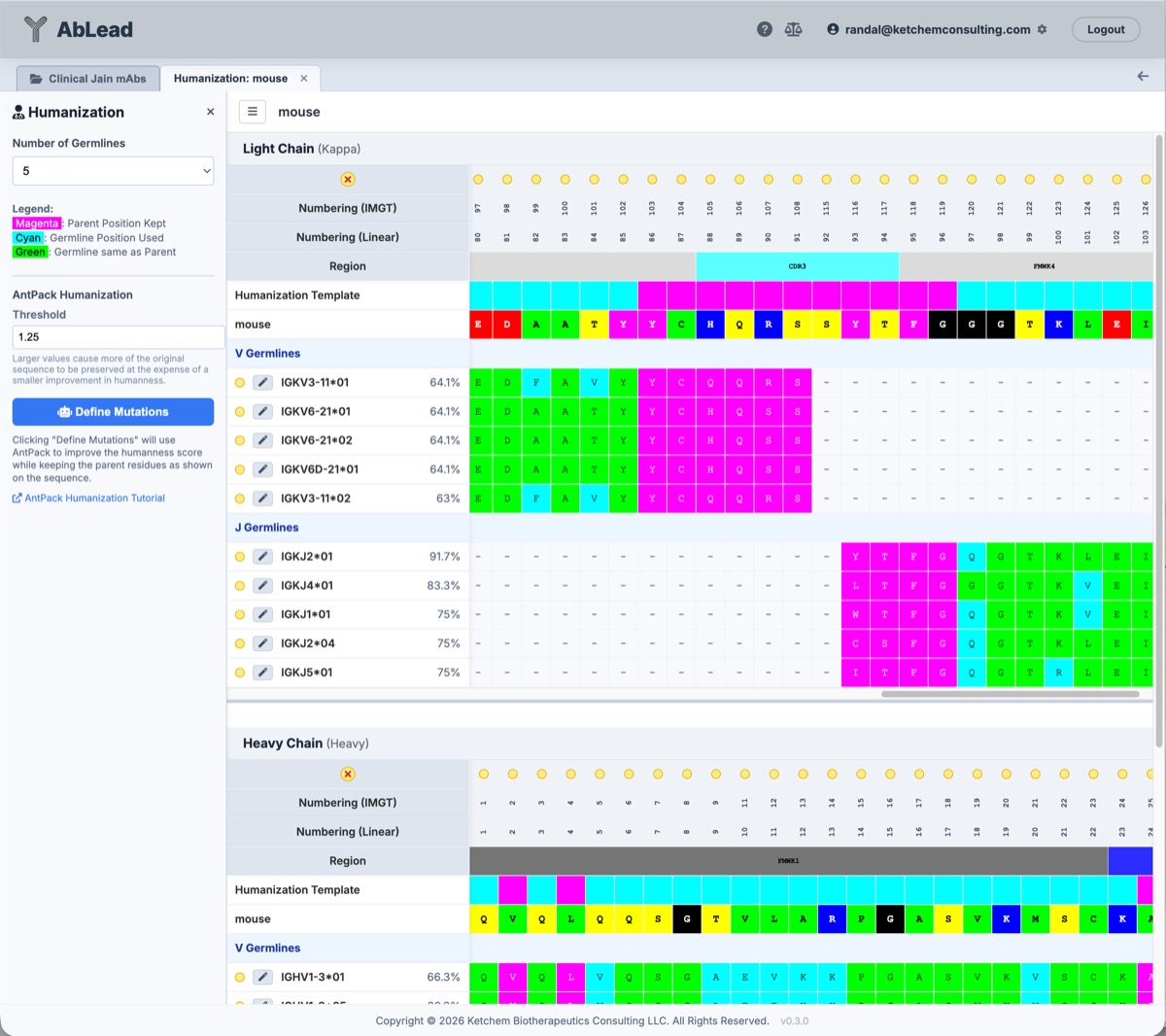
The germline position colors reflect which positions will be mutated:
- Magenta: Parent Position Kept
- Cyan: Germline Position Used (Different)
- Dark Cyan: Germline Position Used (Homologous)
- Green: Germline Same as Parent
-
The Vernier residues are indicated by a 'V', VHH interface positions are indicated with a 'VHH', and predicted paratope contact positions are indicated by 'P' (or 'VP' if also a Vernier residue) in the Honegger Template row. Hovering over a cell displays the predicted paratope binding probability.
-
Target Engineering Set: The top toolbar includes a persistent Target Set dropdown and a + New button to manage destination sets directly within Humanization:
- Direct Set Creation: Click + New to open a dedicated modal dialog to create a new set without leaving Humanization. The dialog automatically suggests incrementing names (
Humanization1,Humanization2, etc.) and immediately synchronizes the active set with the Engineering workspace. - Live Residue Indicators: The mutation indicators across the sequence grid automatically reflect mutations present in the currently selected Target Set.
- Direct Set Creation: Click + New to open a dedicated modal dialog to create a new set without leaving Humanization. The dialog automatically suggests incrementing names (
-
Germline Selection & Staging: For each of the Light Chain and Heavy Chain V and J regions, select the desired germline using the wand icon to the left of the germline name. This opens a modal confirmation dialog allowing you to review the proposed mutations and confirm or redirect the destination Engineering set:
- Complementary Pairing (V + J): Applying a J-gene design into a set that already contains a V-gene design (or vice versa, or across Light and Heavy chains) seamlessly merges them into the candidate set without conflict warnings.
-
Region Overlap Collision Protection (V vs. V or J vs. J): If the target set already contains mutations in that specific chain and region (for example, applying a second V germline to an existing set), the dialog alerts you to the overlap and offers two actions:
- Replace Region: Automatically purges prior mutations in that chain and region before applying the new germline's mutations, preventing orphaned residues or accidental chimeric combinations.
- Create as New Set: Stages the new germline into a fresh set (auto-suggested as
Humanization1,Humanization2, etc.) to explore parallel designs.
-
Click the selection icon (
<i class="fas fa-check-square"></i>) next to the wand icon to select and highlight the positions on the grid that would be mutated for that germline row before applying them.
-
BioPhi Sapiens Humanization: An alternate method to germline picking is to let BioPhi Sapiens humanize the antibody. This is done by selecting the Suggest Mutations button. This opens the staging dialog to apply BioPhi Sapiens-optimized mutations into your chosen Engineering set, following the same exclusion definitions as the template method.
-
Confidence (p): The minimum probability (0.0 to 1.0) required to suggest a mutation. A value of 0.1 is recommended for high-sensitivity humanization.
-
Export Excel: Click the Export Excel button in the top toolbar to download the current sequence grid (including numbering, regions, parent query, Honegger template mask status, and all scored germline rows) as a formatted
.xlsxworkbook. -
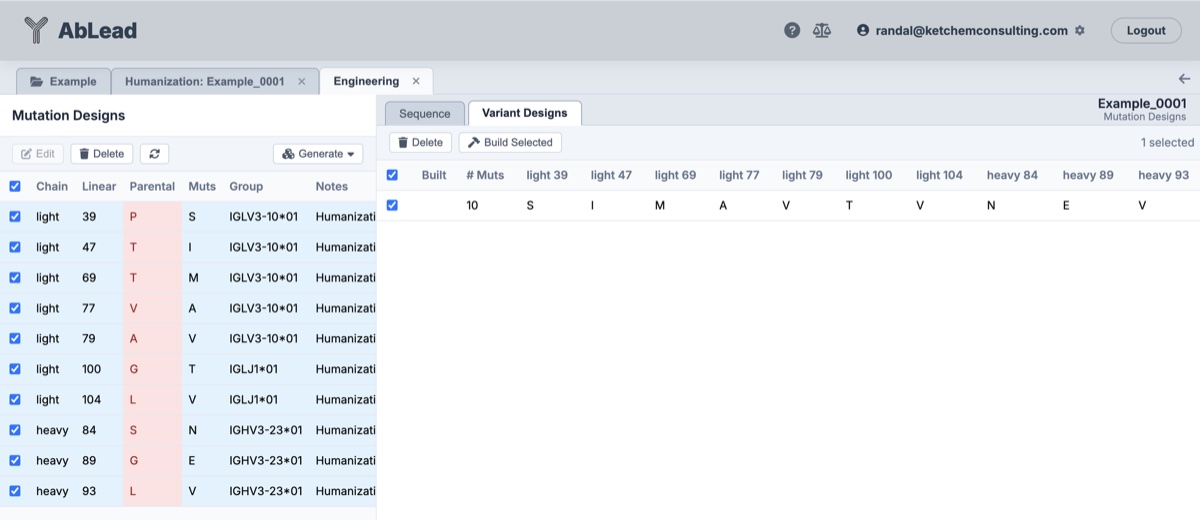
Direct Navigation to Engineering: Upon applying mutations, the success notification includes a direct link (
Engineering ↗) to open the destination set in the Engineering tool, where you can inspect variants, generate combinations, and build new antibodies.
Homology Criteria (ABHAND Classification)
When evaluating sequence homology (used for homology sorting, homology tie-breaking in Bulk Humanization, and Dark Cyan grid cell highlighting), non-identical amino acid pairs are considered homologous if they share the same property group according to the platform-standard ABHAND amino acid classification:
-
Acidic: Aspartate (
D), Glutamate (E) -
Basic: Lysine (
K), Arginine (R), Histidine (H) -
Hydrophobic: Alanine (
A), Leucine (L), Isoleucine (I), Methionine (M), Cysteine (C), Valine (V), Proline (P) -
Aromatic: Phenylalanine (
F), Tryptophan (W), Tyrosine (Y) -
Neutral Polar: Asparagine (
N), Glutamine (Q), Serine (S), Threonine (T) (and ambiguity codesB,Z) -
Deletion / Special: Glycine (
G)
Exclusion Example: Let us suppose the user wants to use standard Honegger exclusions and to add the Vernier residues as excluded positions.
-
Set the Exclusions to Selected.
-
In the Select on Grid section click the Honegger button, then click the Vernier button.
-
Click the wand icon next to each desired germline or click the Sapiens Suggest Mutations button to enter those mutations in the Engineering tool.
3D Structure Visualization & Residue Selection
The Humanization workspace includes an interactive PDBe Mol* 3D structure viewer positioned below the alignment grids, allowing real-time mapping of sequence changes to the three-dimensional antibody structure.
-
Interactive Resizer: Drag the horizontal divider bar directly above the 3D window up or down to adjust the vertical height of the viewer pane.
-
Cartoon Region Coloring: The ribbon structures of the light and heavy chains are colored by region to match the centralized color schemes:
- Variable Domain (Fv): Frameworks (dim gray/silver) and CDRs (blues, purples, cyans) are colored according to domain region standards.
- Constant Domains: Reconstructed constant domains (CL, CH1, hinge, CH2, CH3) are automatically rendered and colored by their specific sub-domain region colors.
-
Selected Residue Highlighting:
- Clicking column headers in the alignment grids (scheme position or linear number) highlights those columns in blue and adds them to the selection set.
- The corresponding residues on the 3D structure are instantly highlighted in CPK element coloring (with position number labels), regardless of which exclusion method is active.
- Residue Style: Toggle the dropdown under the BioPhi Sapiens configurations panel in the sidebar to change the rendering style of selected residues between Spacefill (default) and Ball-and-Stick.
Supported Reference Species
The Humanization tool supports conversion templates and germline analysis using reference sequences from the following species:
| Scientific Name | Common Name (AbLead Badge) |
|---|---|
| Homo sapiens | Human (H) |
| Macaca mulatta | Rhesus (Rh) |
| Mus musculus | Mouse (M) |
| Rattus norvegicus | Rat (R) |
| Oryctolagus cuniculus | Rabbit (Rb) |
| Vicugna pacos | Alpaca (Al) |
| Canis lupus familiaris | Dog (Dg) |
| Felis catus | Cat (Ct) |
| Gallus gallus | Chicken (Ck) |
| Sus scrofa | Pig (Pg) |
Bulk Humanization
For humanizing multiple antibodies in a single batch, see the Bulk Humanize documentation.
References
- The closest germlines are from the IMGT database. See IMGT.
- The germline template regions are described in Honegger, A. “Engineering Antibodies for Stability and Efficient Folding.” Handbook of Experimental Pharmacology, no. 181 (January 2008): 47–68.
- BioPhi Sapiens humanization is described in BioPhi Sapiens Documentation.
- Vernier Residues are described in Foote, J. and Winter, G. “Antibody Framework Residues Affecting the Conformation of the CDRs.” Journal of Molecular Biology 224, no. 2 (1992): 487–99.
- VHH Exclusions are described in Vincke, Cécile, et al. “General Strategy to Humanize a Camelid Single-Domain Antibody and Identification of a Universal Humanized Nanobody Scaffold.” Journal of Biological Chemistry 284, no. 5 (2009): 3273–84.