Sequence View
View, format, inspect, and export antibody sequences across defined formats.
This tool is useful for formatting and exporting sequences for outside evaluation, material ordering, gene synthesis submissions (e.g. Twist, IDT, GenScript), cloning vector construction, and electronic lab notebook (ELN) population.
Accessing the Tool
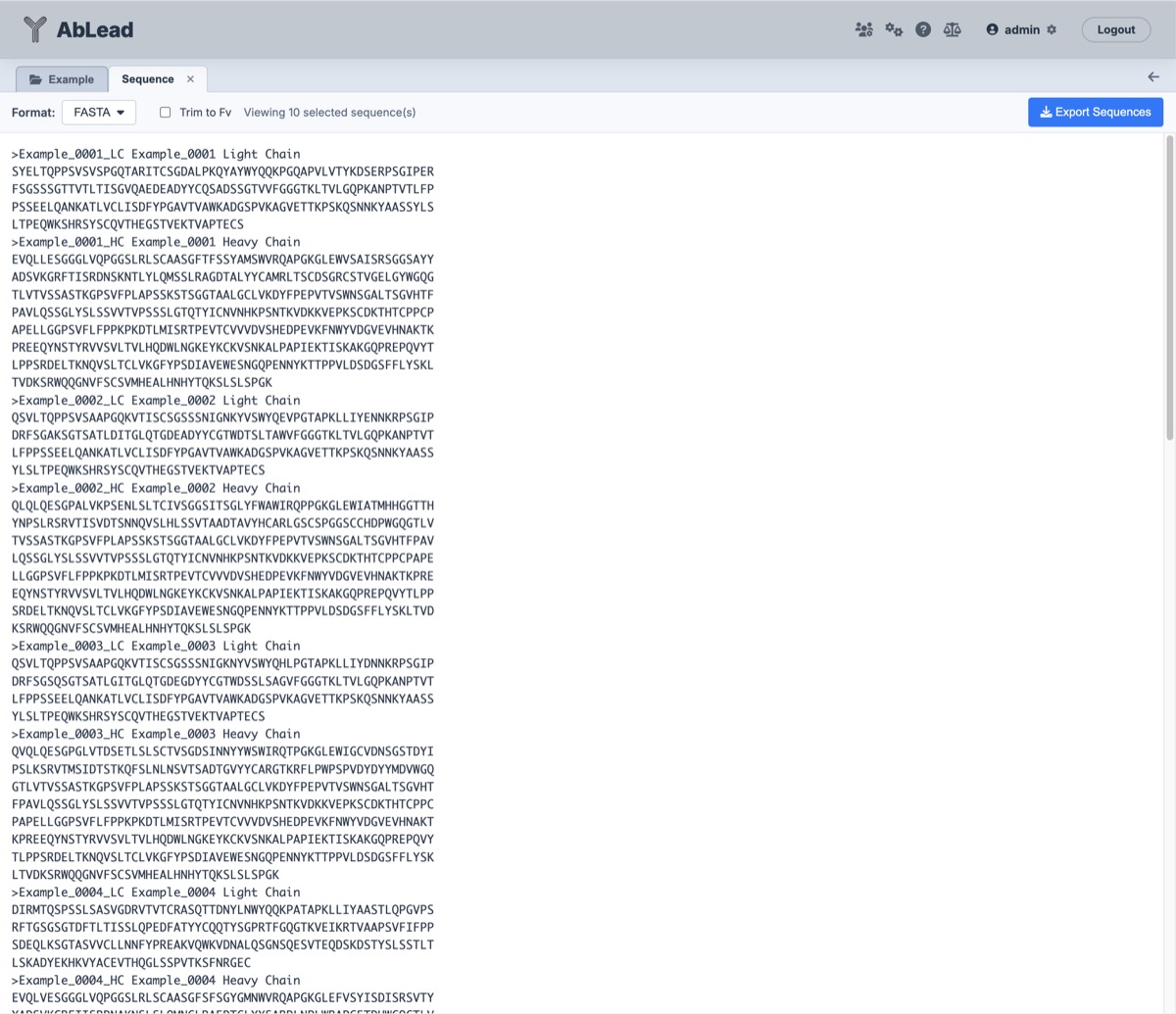
Select at least one antibody in the Project View. Go to the Export menu and select Sequences.... This will open the Sequence View workspace in a new tab.
Using the Tool
-
Format: Select the sequence serialization format from the format dropdown. Supported formats include:
- FASTA: Standard multi-line FASTA formatted records with customizable line wrapping and chunk spacing.
- FASTA (2-Line): Exactly two lines per entry (header line followed by a single unbroken sequence line).
- GenBank (
.gb): Annotated GenBank flat file format including sequence metadata, date, and molecule type (proteinorDNA). - EMBL (
.embl): Standard European Molecular Biology Laboratory flat file representation. - IMGT (
.imgt): IMGT-compliant sequence record format. - PIR (
.pir): Protein Information Resource sequence specification. - Tabular (
.txt): Tab-delimited format with entry name in column 1 and raw sequence in column 2.
-
Line Length (Residues / Bases): Specify the line length in characters for FASTA formatting (default
50), or check the Infinite checkbox to output continuous sequences on a single line without wrapping. - Infinite: Checking the Infinite box (or entering
0) turns off line wrapping, outputting each sequence on a single unbroken line while disabling the numeric line length input. -
Gap Every: Specify a character interval for FASTA formatting to insert space-separated blocks (default
0for continuous sequences without spaces). For example:- Setting
Gap Everyto10groups amino acids into 10-residue blocks separated by a single space (e.g.AAAAA AAAAA ...), matching standard alignment conventions. - When exporting Nucleotide (DNA) sequences, setting
Gap Everyto3groups bases into clear codon triplets (e.g.GAG GTG CAG CTG ...), facilitating reading-frame inspection and cloning boundary verification.
- Setting
-
Trim to Fv: Check the "Trim to Fv" box to automatically trim sequences to their variable domain (Fv), stripping signal/leader peptides and constant region backbones before formatting or reverse translation.
-
Nucleotide (DNA): Check this box to convert amino acid sequences into DNA sequences for either recombinant expression vector cloning or germline-faithful sequence annotation.
-
Strategy / Host Selector: When Nucleotide (DNA) is checked, a strategy selector allows choosing between two distinct reverse-translation paradigms:
-
Species Germline-Matched (Bioinformatics & Annotation): Reconstructs antibody DNA using the natural V and J germline codons from IMGT reference alleles:
- Germline (Auto-Detect Species) (Recommended default): Automatically identifies the antibody's species (Homo sapiens, Mus musculus, rabbit, rat, rhesus, alpaca, dog, cat, chicken, pig) and closest V and J germline alleles.
- Species-Specific Overrides: Explicitly templates frameworks against Human, Mouse, Rabbit, Rat, Rhesus, Alpaca, Dog, Cat, Chicken, or Pig germlines.
- Downstream Compatibility: Maintains authentic antibody framework codons and single-base point mutations for somatic hypermutations, yielding \(\ge 85-95\%\) nucleotide identity to germline V-genes in NCBI IgBLAST, IMGT/V-QUEST, and MiXCR.
-
Host Codon-Optimized (Gene Synthesis): Generates synthetic host-adapted DNA tailored for recombinant expression vectors and gene synthesis ordering (Twist, IDT, GenScript):
- CHO (Cricetulus griseus): Default mammalian host for biopharma manufacturing.
- Human (Homo sapiens / HEK293): Transient transfection and human cellular expression.
- E. coli: Microbial expression for single-chain fragments (scFv), single-domain antibodies (VHH / nanobodies), and Fab fragments.
- P. pastoris (Komagataella phaffii): Yeast host for high-density fermentation and secretable VHH, scFv, and Fab expression.
- S. cerevisiae (Baker's Yeast): Yeast host specialized for Yeast Surface Display (YSD) libraries and screening.
-
-
Live Preview & Text Selection: The central editor displays formatted sequences in real time. Changes to format, line length, gap spacing, trimming, or nucleotide options immediately update the text area. Sequences can be selected and copied directly to the clipboard.
-
Export Sequences: Click the Export Sequences button to download a file formatted identically to the live preview. Downloaded files reflect all configured parameters and dynamically append descriptors, including the target strategy or host clue (e.g.
<Project>_dna_germline_<count>_entries.fasta,<Project>_dna_cho_<count>_entries.fasta, or<Project>_dna_yeast_<count>_entries.fasta).
Species Germline-Matched Nucleotide (DNA) Export
When importing antibody nucleotide sequences into external sequence annotation, immune repertoire analysis, or somatic hypermutation (SHM) tools—such as NCBI IgBLAST, IMGT/V-QUEST, or MiXCR—relying on standard synthetic codon optimization creates significant analytical issues.
The Challenge with Synthetic Codon Optimization in Annotation
External antibody annotation tools rely on high nucleotide identity (\(\ge 80-85\%\)) against species reference germline databases (IMGT V and J genes) to accurately align framework regions, determine CDR boundaries, and quantify somatic hypermutation.
When an antibody protein sequence is back-translated using synthetic host codon optimization (such as CHO or Human HEK293):
-
Synonymous codon selections systematically replace natural germline codons with host-preferred triplets (e.g. replacing germline Leucine
CTAorCTCwithCTG, or ArginineAGAwithCGC/CGG). -
Because random synonymous codons match at roughly ~66% nucleotide identity (2 out of 3 bases matching across non-degenerate positions, dropping lower for 6-codon amino acids like Arginine and Leucine), the resulting synthetic DNA sequence aligns to its parent germline at only ~60–68% nucleotide identity.
-
At this low sequence identity, tools like IgBLAST and IMGT/V-QUEST fail to recognize the framework boundaries, misassign or fail to assign the parent V-gene, or flag dozens of artificial nucleotide mutations that never occurred biologically.
Species Germline-Matched Algorithm
AbLead provides a dedicated Species Germline-Matched reverse-translation engine that reconstructs authentic antibody nucleotide sequences directly from IMGT reference germline alleles:
-
Automated Species & Germline Allele Identification: Using AntPack IMGT numbering and AbLead's
GermlineAssigner, the engine analyzes the protein sequence and identifies the host species (Homo sapiens, Mus musculus, rabbit, rat, rhesus macaque, alpaca, dog, cat, chicken, or pig) and the closest matching IMGT V-gene and J-gene alleles. Users can also explicitly override the species selection via the toolbar selector. -
Positional Germline Codon Mapping: Each amino acid position is mapped against gapped IMGT reference nucleotide codons across Framework 1 through Framework 3 (IMGT positions 1–104). Wherever the protein residue matches the reference germline allele, the exact authentic germline codon is preserved (100% nucleotide match).
-
Minimal Hamming Distance for Somatic Hypermutation (SHM): When an amino acid differs from the reference germline residue (due to in vivo somatic hypermutation or engineering point mutations), the algorithm selects the synonymous codon that has the minimal Hamming distance (fewest nucleotide changes) from the reference germline codon. Because physiological somatic hypermutation by activation-induced cytidine deaminase (AID) typically introduces single-nucleotide point mutations, this heuristic recreates realistic single-base transitions and transversions (1 mismatch) rather than multi-base synonymous disruptions (2–3 mismatches).
-
CDR3 Loop Codon Preferences: For junctional and CDR3 residues (IMGT positions 105–117) where heavy V-D-J recombination, exonuclease trimming, and N-nucleotide addition prevent direct V-gene templating, the engine draws codons from an empirical codon frequency table compiled directly from functional antibody germlines of that specific species. For example, in human antibodies, germline-derived codon selection preserves natural immunoglobulin biases, such as
AGAfor Arginine (47.9% in human germlines vs.CGC/CGGin synthetic host tables),CTGfor Leucine (66.2%), andTCCfor Serine (28.1%). -
Framework 4 J-Gene Codon Templating: Framework 4 residues (IMGT positions 118–128) are templated against the species' canonical J-gene germlines (e.g. human IGHJ or IGKJ motifs like
WGQGTLVTVSS), ensuring natural Framework 4 coding without synthetic codon shifts. -
Validation & 100% Translation Fidelity: Before emitting the nucleotide sequence, the engine translates the resulting DNA in standard reading Frame 1 and validates that the translated amino acid sequence matches the input sequence with 100% fidelity.
Performance & Downstream Compatibility
In benchmark evaluations against therapeutic antibodies (such as Trastuzumab VH):
-
Standard CHO Codon Optimization: Yields ~68.4% nucleotide identity to the parent human germline allele (IGHV3-66*01), causing IgBLAST to report extensive framework divergence and spurious mutations.
-
Species Germline-Matched Export: Achieves 87.8% aligned nucleotide identity to the parent germline allele, maintaining framework recognition, authentic CDR boundary calls, and clean somatic hypermutation tracking in IgBLAST, IMGT/V-QUEST, and MiXCR.
Codon-Optimized Nucleotide (DNA) Export
When designing genes for synthesis or vector cloning, naive reverse translation (simply assigning the single most common codon to each amino acid) leads to frequent synthesis rejections, cloning failures, and expression problems. AbLead incorporates a deterministic, antibody-tailored codon optimization engine designed to maximize synthesis success and cloning compatibility.
[!IMPORTANT] This codon optimization engine is not intended for large-scale commercial production. It is intended for research and small-scale applications. For large-scale production, please contact a commercial synthesis provider.
Why Standard Reverse Translation Fails in Antibodies
-
Repetitive Sequences & Homopolymers: Antibodies naturally contain repeating sequence motifs, including synthetic scFv linkers (such as
(GGGGS)3or(GGGGS)4), poly-Serine or poly-Alanine stretches in CDR loops, and conserved framework turn motifs (such asWGQGTLVTVSS). Naive 1-to-1 codon substitution generates identical repeating nucleotide 15-mers to 45-mers (e.g.GGCGGCGGCGGCAGC...), which gene synthesis vendors (Twist, IDT, GenScript) reject due to hairpin formation, primer misannealing, and polymerase slippage. -
Accidental Restriction Enzyme Sites: Naive codon combinations frequently create unwanted restriction sites across codon boundaries (e.g. Type IIS Golden Gate sites like BsaI or BsmBI, or standard MCS sites like EcoRI, BamHI, HindIII, NotI, and XhoI), rendering sequences incompatible with downstream cloning vectors.
-
Host Transfer Inefficiencies: Mammalian hosts (CHO, Human), bacterial hosts (E. coli), and yeast hosts (P. pastoris, S. cerevisiae) possess starkly different codon usage preferences:
- E. coli strongly prefers
CCGfor Proline andAAAfor Lysine, whereas mammalian cells favorCCC/CCTandAAG. - Yeast species (P. pastoris and S. cerevisiae) have an AT-rich coding bias (~40–43% GC) compared to the GC-rich preference of mammalian cells (~50–55% GC).
- In yeast, Arginine codons
CGC,CGG, andCGAare rarely utilized and can cause severe translational bottlenecks; yeast overwhelmingly prefersAGA(~50% of all Arg codons). - For Leucine, mammalian systems heavily favor
CTG(~40–44%), whereas P. pastoris favorsTTGand S. cerevisiae favorsTTGandTTA. - For Proline, yeast strongly prefers
CCA, whereas mammals and E. coli favorCCC,CCT, orCCG. - Using mammalian-biased or bacterial-biased codons in yeast frequently causes translational pausing, mRNA degradation, and dramatic reductions in recombinant yield.
- E. coli strongly prefers
Heuristic Optimization Pipeline
AbLead's codon optimizer applies a multi-pass heuristic pipeline:
-
Host-Specific Codon Frequency Tables: Codon usage tables for CHO, Human, E. coli, Pichia pastoris (Komagataella phaffii), and Saccharomyces cerevisiae are derived from curated genomic usage databases and validated expression studies. Low-frequency host codons (relative frequency \(< 8-10\%\)) are excluded to prevent tRNA exhaustion and ribosomal stalling.
-
Repeat Motif Diversification: When identical amino acids occur consecutively (or within close proximity, as in
(GGGGS)nlinkers), the engine alternates and samples among viable synonymous codons rather than repeating the same triplet. This breaks up nucleotide periodicity while retaining high-frequency codons. -
Homopolymer Run Suppression: The sequence is scanned to eliminate homopolymer runs of 5 or more identical consecutive nucleotides (e.g.
AAAAA,GGGGG,CCCCCC,TTTTT). When a run is detected, synonymous substitutions are introduced across overlapping codons to cap homopolymers at \(\le 4\) bases. -
Cloning Restriction Site Neutralization: The DNA sequence is scanned on both the coding strand and its reverse complement for common molecular cloning restriction sites:
- Type IIS (Golden Gate & Modular Assembly): BsaI (
GGTCTC), BsmBI (CGTCTC), SapI (GCTCTTC), AarI (CACCTGC). - Type II (Standard Multiple Cloning Sites): EcoRI (
GAATTC), BamHI (GGATCC), HindIII (AAGCTT), NheI (GCTAGC), NotI (GCGGCCGC), XhoI (CTCGAG), AgeI (ACCGGT), KpnI (GGTACC).
When any restricted motif is identified, the engine silently substitutes an alternative synonymous codon in the overlapping window, preserving the amino acid sequence while destroying the restriction site.
- Type IIS (Golden Gate & Modular Assembly): BsaI (
-
Cryptic Signal Clean-up: Premature polyadenylation hexamers (
AATAAAandATTAAA) and aberrant transcription termination motifs are eliminated to prevent premature mRNA cleavage and truncation across mammalian and yeast transcripts. -
Deterministic & 100% Translation Fidelity: Codon selection uses a deterministic hash seed derived from the sequence and entry name, ensuring reproducible DNA outputs across runs. Prior to emission, an automated Frame 1 translation validation confirms that the nucleotide sequence translates exactly into the original amino acid sequence without discrepancies.
Chain Ordering & Reading Frames
AbLead adheres to strict biological conventions across all sequence exports:
- Light Chain Before Heavy Chain:
In all multi-chain constructs (paired Fvs, scFvs, multispecifics), the Light chain (
_LC) is always positioned before the Heavy chain (_HC), ensuring complete parity with Alignment and Clading views. - In-Frame Domain Coding (Frame 1): Exported nucleotide sequences start directly at codon 1 (IMGT position 1) and proceed through the end of Framework 4 in standard reading Frame 1.
- Open Reading Frames for Cloning:
Variable domain (Fv) sequences are exported without terminal stop codons, allowing seamless in-frame fusion to vector constant domains (CH1-CH3, CL) or affinity tags. Full-length sequences that terminate in an explicit stop codon (
*) encode the host-preferred stop triplet (TGAfor CHO and Human;TAAfor E. coli, P. pastoris, and S. cerevisiae).
FASTA Formatting Options
When FASTA format is selected, the toolbar provides real-time controls to customize how sequence residues are laid out:
- Line Length (Residues / Bases) & Infinite: Controls how many amino acid residues or nucleotide bases appear on each wrapped line (default
50). Checking the Infinite box (or entering0) turns off line wrapping, outputting each sequence on a single unbroken line while disabling the numeric input. - Gap Every (Residues / Bases): Inserts a single space every N residues or bases (default
0). When configured with a positive integer (e.g.10for amino acid blocks, or3for codon triplets), characters on each line are grouped into readable chunks separated by spaces. - Live Preview & Download: Changing any value or toggling Infinite immediately refreshes the formatted sequence in the preview window with built-in debouncing, and clicking Export Sequences downloads the formatted
.fastafile matching the on-screen configuration.
References
- See Biopython SeqIO for more information on the supported formats.
- See Kazusa Codon Usage Database for species codon frequency statistics.