Structure Files (PDB / mmCIF)
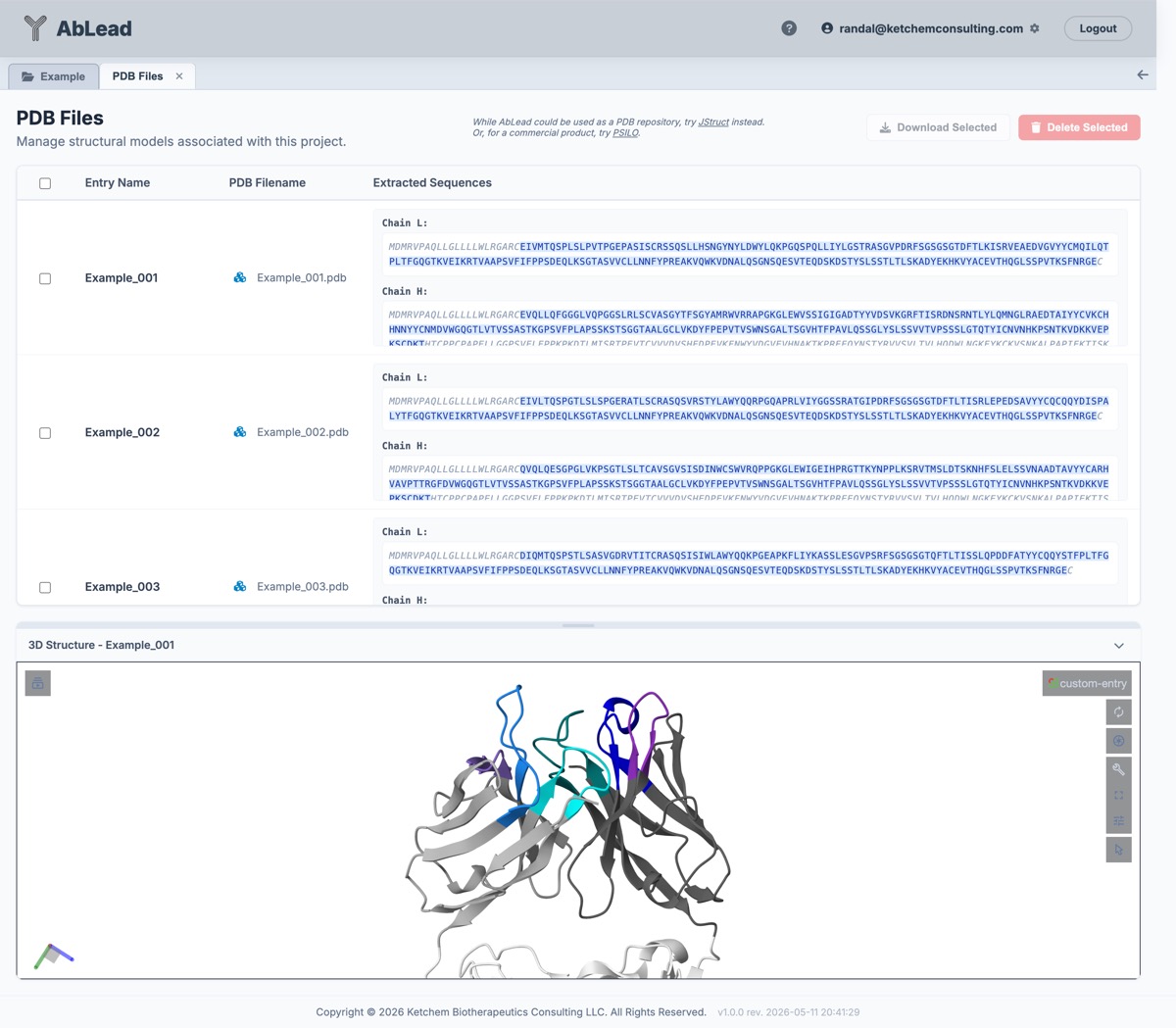
The Structure Files view allows you to manage and visualize 3D structural models (PDB or mmCIF) associated with your project.
[!NOTE] Format Normalization: All uploaded structure files (including
.cifand.mmcifmodels) are automatically converted to standard PDB format upon upload and saved to the database. Consequently, download options, API responses, and visualizer sessions will always operate on standard PDB formatted data.
This tool is useful for inspecting the sequences extracted from structure files, matching them to your entry sequences, downloading or deleting selected structure files, and visualizing the 3D structures.
Accessing the Tool
Go to the Edit menu in the Project View and select PDB Files. This will open the structure files interface in a new tab.
Using the Tool
- Structure Filename: Displays the name of the structure file (PDB or mmCIF). Clicking the button to the left of the filename toggles the 3D structure viewer.
- 3D Structure Viewer: Click the toggle button to open/close the Molstar window at the bottom of the page to visualize the 3D structure. The backbone is colored by region (FMWK, CDRs) using the project's color system. Residues and side chains are not displayed to keep the view clean.
- Draggable Pane: The viewer pane can be resized by dragging the handle at the top of the pane.
- Extracted Sequences: Displays the sequences extracted from the structure file, broken down by chain. Residues that match the entry sequence are highlighted.
- Download Selected: Select one or more entries and click to download a ZIP file containing the structure files.
- Delete Selected: Select one or more entries and click to remove the structure files from the entries. This does not delete the associated entries.
While AbLead can be used as a structure repository, for more robust solutions consider using JStruct or commercial products like Molecular Operating Environment's PSILO.
References
- PDBe Mol* is used for 3D structure visualization. See Mol* for details.
- ABodyBuilder2 (ImmuneBuilder) is described in ImmuneBuilder on GitHub.