Extract Fvs
Extract variable domains (Fv pairs) from antibodies (including full-length IgGs, single-chain antibodies, and multispecific formats) for downstream analysis, humanization, or construct re-assembly.
Rather than manually extracting the variable regions and creating new entries, you can use this tool to extract them automatically, allowing you to reflect my core work principle: "Be Inherently Lazy" by letting a computer do the work for you.
Accessing the Tool
Select one or more entries in the Project View. Go to the Edit menu and select Extract Fvs....
Using the Tool
When the modal opens, the tool lists all detected variable domains for the selected entry:
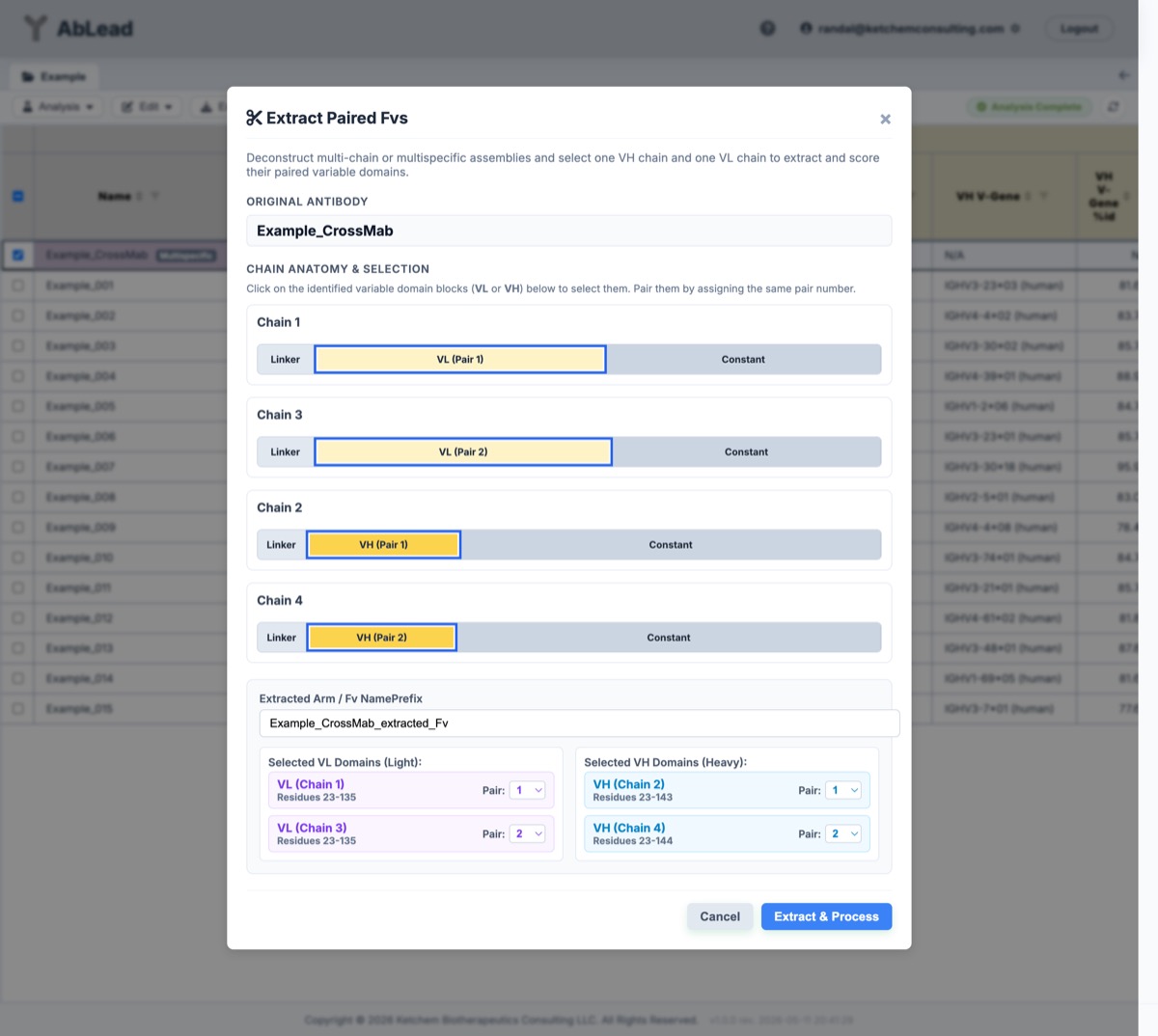
- Designate Fv Pairs: For each identified variable domain (VH and VL), select its target Fv pair designation using the dropdown menus. Up to 10 Fv pairs can be designated.
- Chain Selection: The tool automatically detects whether each variable domain is a Heavy (VH) or Light (VL) chain.
- Confirm and Extract: Click Extract to submit. The tool:
- Uses ANARCI to calculate the exact boundaries of each variable domain.
- Isolates the variable region sequences (excluding constant domains and linkers).
- Stores the isolated VH and VL sequences as new individual Fv entries in the project.
- Names the new Fvs using the base name of the parent entry followed by the pair suffix (e.g.,
Parent_Name_extracted_Fv_Pair1).
Why Extract Fvs?
- Score Multispecific Arms: Multispecific entries bypass sequence-level scoring. Extracting their Fvs allows for the calculation of individual Humanness (OASign), liabilities, pI, and AbLang/AbLang2/IgBert stability metrics for each binding arm.
- Construct Engineering: Once Fvs are extracted, they populate the "Selected Variable Regions" sidebar in the Assembler for easy recombining, humanizing, or engineering into new multi-chain variants.