Clinical Comparison
Visualizes the attributes of an entry against the same attribute's ranges in the clinical-stage antibody set from Jain et al., expanded and aligned using the Thera-SAbDab human dataset.
This tool is useful for comparing the properties of an antibody to the clinical-stage antibody set. Note: While the clinical-stage antibody entries used to define the ranges may have been successfully developed, many might not have been easy to develop. "Better" is better than "in range".
You could do this evaluation manually by comparing your AbLead scores against the clinical set, but this tool allows you to Be Inherently Lazy by doing it automatically.
Accessing the Tool
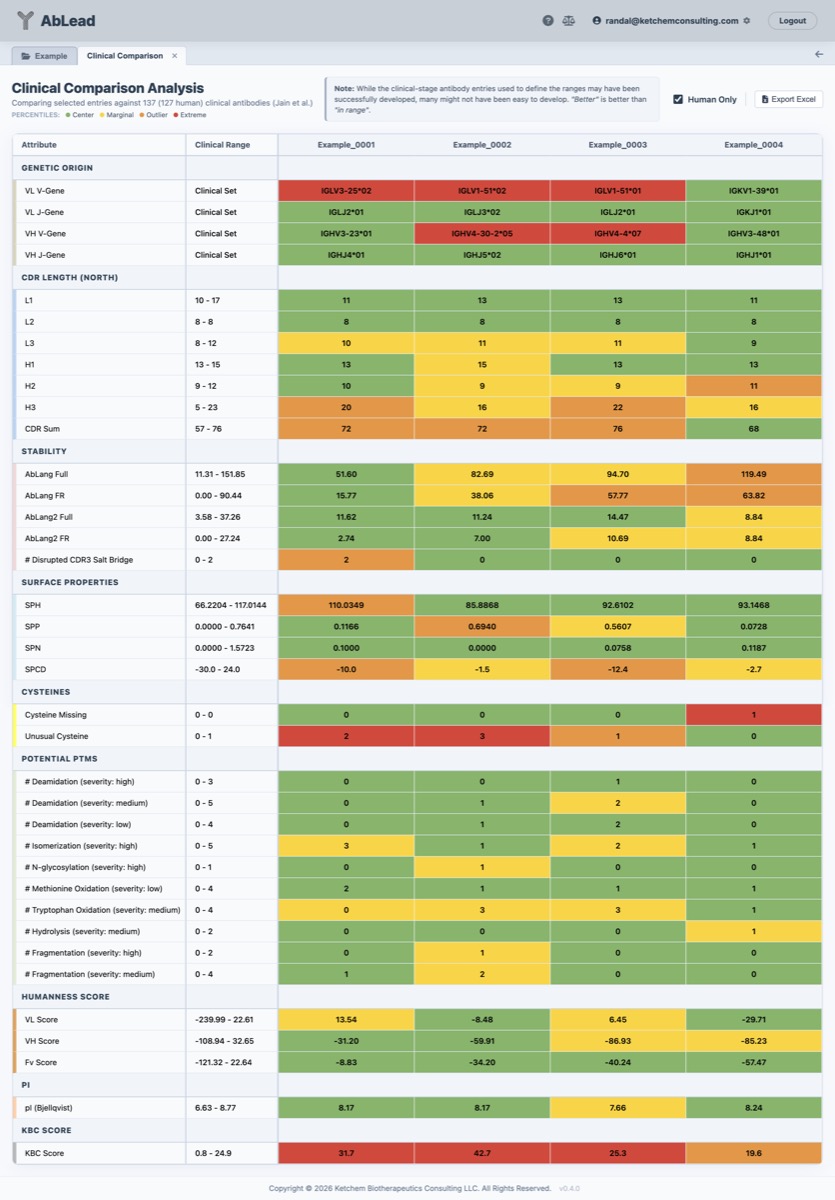
Select at least one antibody in the Project View. Go to the Analysis menu and select Clinical Comparison. This will open the Clinical Comparison workspace in a new tab.
Using the Tool
Comparing selected entries against the reference set of clinical-stage antibodies from Thera-SAbDab and Jain et al. (evaluated across sequence features, surface developability metrics, OASign humanness, and RPEMHC Class II immunogenicity across the 11 Core Global DRB1 panel).
Column Descriptions
- Attribute: The comparable attribute from the clinical set (e.g., CDR lengths, charge, pI, hydrophobicity, OASign humanness, RPEMHC VL/VH/Fv helper T-cell epitope load).
- Clinical Range: The distribution and range of values observed across the clinical reference set (min to max).
- Entry Value: The exact calculated value for the selected project antibody.
Color Coding
The background color of the entry values indicates how they compare to the statistical distribution of the clinical-stage antibody landscape:
Categorical Attributes:
- Green: The entry's category is present in the clinical set.
- Red: The entry's category is not found in the clinical set.
Numeric Attributes (Percentile Distribution):
- Green: Values between the 25th and 75th percentiles (inclusive) — represents the typical clinical benchmark window.
- Yellow: Values between the 5th and 25th percentiles, or between the 75th and 95th percentiles.
- Orange: Values below the 5th percentile, or above the 95th percentile — flags atypical outliers.
- Red: Values outside the minimum and maximum ranges observed across the entire clinical reference set.
Excel Export
The grid may be exported for inclusion in an ELN or report.
Included Molecules
The reference dataset consists of the following 584 human clinical antibodies from Thera-SAbDab and Jain et al, with IGKC*01 added for Kappa chains, IGLC1*01 added for lambda chains, and IgHG1*01 for heavy chains. Surface values are calculated for the Fv in the presence of its Fab constant domains.
abelacimab, abiprubart, abrezekimab, abrilumab, acrixolimab, actoxumab, adakitug, adalimumab, adecatumumab, adezkibart, adimanebart, adintrevimab, aducanumab, afasevikumab, afimkibart, alcestobart, aldastotug, alemtuzumab, alextatug, alirocumab, alomfilimab, alsevalimab, amlenetug, amlitelimab, amrecibart, amubarvimab, anetumab, anifrolumab, anrukinzumab, ansipastobart, ansuvimab, anumigilimab, anzurstobart, apitegromab, aprutumab, ascrinvacumab, aselizumab, astegolimab, atenastobart, atezolizumab, atidortoxumab, atigotatug, atinumab, atisnolerbart, atoltivimab, avdoralimab, avelumab, avitotamig, avizakimab, azirkitug, balonkibart, balstilimab, bamlanivimab, bapotulimab, barecetamab, batoclimab, bebtelovimab, becotatug, bedinvetmab, befovacimab, belantamab, belimumab, belrestotug, beludavimab, bempikibart, bentracimab, bepranemab, berlimatoxumab, bersanlimab, bevacizumab, bexmarilimab, bezetabart, bezlotoxumab, bifikafusp, bimagrumab, bimekizumab, bintrafusp, bleselumab, blosozumab, bococizumab, bocunebart, boserolimab, botensilimab, brazikumab, briakinumab, brivestobart, brodalumab, brolucizumab, brontictuzumab, bulumtatug, burosumab, cabiralizumab, calotatug, calpurbatug, camidanlumab, camoteskimab, canakinumab, canrivitug, carlumab, casdozokitug, cemiplimab, cenvacibart, certolizumab, cetrelimab, cifurtilimab, ciletatug, cilgavimab, cinpanemab, cixutumumab, claseprubart, clazakizumab, clervonafusp, clesrovimab, cliramitug, cobolimab, cofetuzumab, conatumumab, cosibelimab, crebankitug, crexavibart, crizanlizumab, crotedumab, crusekitug, cudarolimab, dacetuzumab, dalidnetug, dalnicastobart, dalutrafusp, danburstotug, dapirolizumab, daratumumab, dargistotug, daxdilimab, dazukibart, dectrekumab, denintuzumab, denosumab, denrakibart, depemokimab, dibotatug, diridavumab, disitamab, dostarlimab, drotokibart, drozitumab, duligotuzumab, dupilumab, durvalumab, dusigitumab, duvakitug, ebdarokimab, eblasakimab, ebrasodebart, ebribafusp, ebronucimab, eciskafusp, ecleralimab, eclutatug, eculizumab, efalizumab, efungumab, eldelumab, elezanumab, elipovimab, eltivutabart, eltrekibart, emactuzumab, emapalumab, emibetuzumab, emiltatug, emugrobart, emunkitug, enapotamab, encelimab, enfortumab, enlonstobart, enoblituzumab, enokizumab, enoticumab, enuzovimab, enzelkitug, eptinezumab, erenumab, ersodetug, erzotabart, etakafusp, etaracizumab, etesevimab, etokimab, etrolizumab, eurestobart, evinacumab, evolocumab, evunzekibart, exbivirumab, exlinkibart, ezabenlimab, falbikitug, farletuzumab, fasinumab, favezelimab, feladilimab, felmetatug, felzartamab, fepixnebart, fezakinumab, fianlimab, figitumumab, firivumab, firsekibart, fiztasovimab, flanvotumab, fletikumab, foralumab, foravirumab, fremanezumab, freneslerbart, fresolimumab, frovocimab, fulranumab, galcanezumab, galegenimab, gancotamab, ganitumab, gantenerumab, garadacimab, garetatug, garetosmab, garivulimab, gedivumab, gimsilumab, ginisortamab, glembatumumab, golimumab, golocdacimab, gorivitug, greziprubart, gulgafafusp, guselkumab, ianalumab, ibramvibart, icrucumab, idactamab, idarucizumab, ifabotuzumab, ifinatamab, iluzanebart, imalumab, imeroprubart, imgatuzumab, imneskibart, imzokitug, inclacumab, indematug, indenebart, indusatumab, inebilizumab, intetumumab, iparomlimab, ipilimumab, iscalimab, itepekimab, ivuxolimab, ixekizumab, izastobart, ladiratuzumab, lampalizumab, lanadelumab, landogrozumab, lanerkitug, latikafusp, latozinemab, lecankitug, lemzoparlimab, lenvervimab, lenzilumab, lepunafusp, lerdelimumab, lesabelimab, lesofavumab, letaplimab, levilimab, lexatumumab, libevitug, libivirumab, licaminlimab, ligelizumab, linavonkibart, lipustobart, lirentelimab, lirilumab, litifilimab, lixudebart, lodapolimab, lodelcizumab, lomtegovimab, lonigutamab, lorvotuzumab, lotivibart, lucatumumab, lumretuzumab, lunlekitug, lupartumab, lusvertikimab, luvagrobart, maftivimab, manelimab, maridebart, marstacimab, masavibart, mavrilimumab, melredableukin, melrilimab, metelimumab, mevonlerbart, mezagitamab, mibavademab, micvotabart, milatuzumab, mipasetamab, mitazalimab, modakafusp, moflerafusp, motavizumab, mozistobart, mupadolimab, murlentamab, nadecnemab, namilumab, narlumosbart, narnatumab, narsoplimab, navivumab, necitumumab, negalstobart, nelistotug, nelmastobart, nepuvibart, nesvacumab, nimacimab, nimotuzumab, nipocalimab, nirsevimab, nisevokitug, nivisnebart, nivolumab, nofazinlimab, nurulimab, nuvustotug, oberotatug, ocaratuzumab, ociperlimab, ocrelizumab, odesivimab, ofatumumab, ogalvibart, olaratumab, oleclumab, olendalizumab, oloctinebart, olokizumab, omalizumab, omectatug, omodenbamab, onfekafusp, ontamalimab, onvatilimab, opicinumab, opucolimab, ordesekimab, ormutivimab, orticumab, osemitamab, osocimab, otilimab, otlertuzumab, oturkibart, oxelumab, ozureprubart, pabinafusp, pacibekitug, pacmilimab, palivizumab, pamlectabart, pamrevlumab, panitumumab, panobacumab, paridiprubart, parsatuzumab, patecibart, pateclizumab, patritumab, pelgifatamab, pembrolizumab, pemivibart, perenostobart, peresolimab, pertuzumab, pexelizumab, picankibart, pimivalimab, pimurutamab, pinatuzumab, plozalizumab, plutavimab, polatuzumab, polzastobart, ponezumab, ponsegromab, posnafusp, potravitug, pozelimab, pradusinstobart, prafnosbart, prasinezumab, prezalumab, pritumumab, puxitatug, quisovalimab, rademikibart, radretumab, rafivirumab, ragifilimab, ralpancizumab, ralzapastotug, ramantamig2, ramucirumab, ranibizumab, rapaprutug, ravagalimab, ravulizumab, recibokibart, refanezumab, regdanvimab, relatlimab, remternetug, remzistotug, renvistobart, reslizumab, retavibart, retifanlimab, revdofilimab, rezorstobart, rilotumumab, rinatabart, rinucumab, rivabazumab, robatumumab, rocatinlimab, roledumab, romlusevimab, romosozumab, rontalizumab, rosmantuzumab, rosnilimab, rovalpituzumab, rozibafusp, ruzaltatug, sabatolimab, samatatug, sarilumab, sasanlimab, satralizumab, secukinumab, selicrelumab, seribantumab, setrusumab, sibeprenlimab, sifalimumab, sigvotatug, siltartoxatug, simaravibart, simlukafusp, sintilimab, sipavibart, sirexatamab, sirtratumab, sirukumab, socazolimab, solabafusp, solanezumab, solnerstotug, solrikitug, sonavibart, sonesitatug, sotevtamab, sotrovimab, sovipostobart, spartalizumab, spesolimab, stamulumab, sugemalimab, suptavumab, surzebiclimab, suvemcitug, suvratoxumab, tabalumab, tabirafusp, tafolecimab, tagitanlimab, talacotuzumab, tamgiblimab, tamrintamab, tanezumab, tarextumab, tazlestobart, tecotabart, telazorlimab, telikibart, telisotuzumab, temtokibart, teprotumumab, tesidolumab, tezepelumab, tilrekimig2, tilvestamab, timcevibart, timolumab, tinurilimab, tiragolumab, tislelizumab, tisotumab, tixagevimab, tixestobart, tobevibart, tocilizumab, torudokimab, torvutatug, tosatoxumab, tovetumab, tozorakimab, trabikibart, tralokinumab, trastuzumab, traxivitug, tregalizumab, tremelimumab, trevogrumab, trinbelimab, trovostobart, tulisokibart, tuparstobart, turenkibart, tuvonralimab, ucenprubart, ulenistamab, ulocuplumab, ulviprubart, umesolerbart, uprevstobart, urabrelimab, urelumab, urtoxazumab, ustekinumab, utomilumab, vamikibart, vantictumab, varisacumab, varlilumab, varokibart, vebanvibart, venanprubart, vensobafusp, verekitug, verzistobart, vilamakitug, vilastobart, vixarelimab, vixticibart, volagidemab, vopikitug, vopratelimab, vulinacimab, xentuzumab, zadoprubart, zagotenemab, zalifrelimab, zaltenibart, zalutumumab, zanolimumab, zelminemab, zeluvalimab, zigakibart, ziltivekimab, zimberelimab, zinlirvimab, zovostotug
References
- Raybould MIJ, Marks C, Lewis AP, Shi J, Bujotzek A, Taddese B, Deane CM (2020) Thera-SAbDab: the Therapeutic Structural Antibody Database. Nucleic Acids Res. 48(D1):gkz827.
- Jain, Tushar, Tingwan Sun, Stéphanie Durand, et al. “Biophysical Properties of the Clinical-Stage Antibody Landscape.” Proceedings of the National Academy of Sciences, January 17, 2017, 1–6.